Repo Settings — read-only AI system summary and the danger zone
For: all
Tier: free+
Time: ~4 min
Why you'd do this
The Settings page used to be a mix of read-only fields and a handful of editable controls (role checkboxes, risk dropdown). Since 2026-06, all compliance-affecting fields are managed in one place — the Profiling Wizard — and Settings became a clean read-only summary plus the danger zone. This avoids the "two surfaces, two answers, which one wins?" confusion that used to bite users who edited the dropdown but forgot to re-run the wizard.
Before you start
- OWNER role on the repo for the wizard re-run and danger-zone actions; members see the same summary read-only
- Awareness that unlinking is reversible but DELETE is permanent — scan history, evidence, and attestations all gone
Step 1
From the repo overview, click the Settings tab. The page has two main sections: the AI System Profile summary at the top, and the Danger Zone at the bottom (owner only). Between them: a collapsed Change history showing every wizard answer change with timestamp + user email.
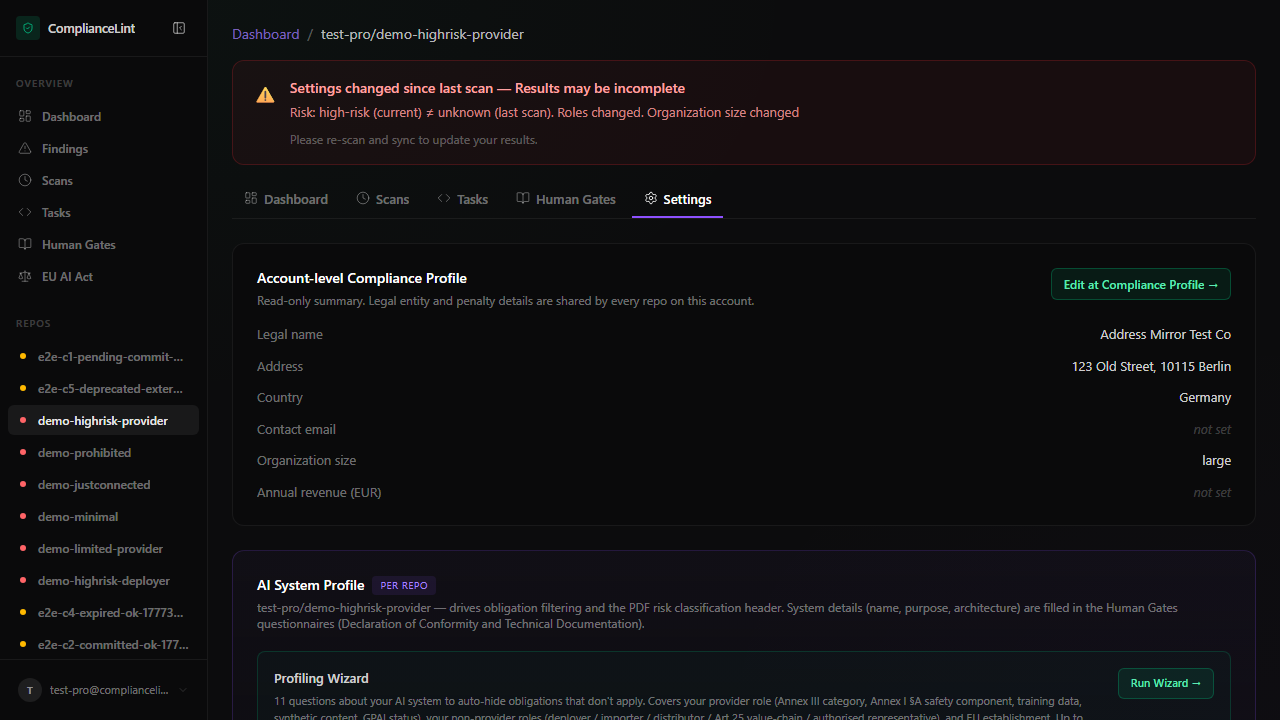
What you'll see: Repo settings page. The AI System Profile section is grouped into five sub-sections — Identity / Risk / Role identity / AI system properties / Scope carve-outs — and there's a "Run Wizard →" button at the top-right of the section header.
Step 2
Every row is read-only. The five sub-sections mirror the wizard's grouping:
- Identity — AI system name, derived role list (e.g. "Provider, Deployer")
- Risk — risk classification + which Annex III category (if any) + Art. 6(3) derogation
- Role identity — for each of the six EU AI Act roles, whether you legally fall in that role + whether the AI you handle in that role is high-risk
- AI system properties — Annex I §A safety component, training data, synthetic content, GPAI, GPAI systemic risk
- Scope carve-outs — Art. 3(1) AI-system definition, territorial scope, military/defence, research-only, open-source
To change anything, click Run Wizard → at the top-right of the section. You will be taken to the wizard with every question pre-filled with the current values. Change what you need, click Finish, and the read-only summary updates immediately.
Step 3
A collapsed <details> below the summary lists every wizard answer change: timestamp, user email, field, old value, new value. Open it when you need to explain to a colleague (or auditor) why a finding is now NA when it used to be flagged. The list is append-only; entries are never edited or deleted.
Step 4
Owner-only. Three actions:
Unlink repo — removes the repo from the dashboard but preserves all data. Re-attaching later (ask your AI to set up ComplianceLint for this project again) restores the same project_id + scan history. Use this when a downgrade lock-state forces you to drop one repo to keep others active.
Transfer ownership (planned, not yet shipped) — will let an owner pass primary ownership to another invited user.
Delete repo PERMANENTLY — wipes scans, evidence, attestations, audit trail. Two-confirmation modal asks you to type the repo name. Cannot be undone. Use only when the project is genuinely dead AND you've exported the Compliance All-in-One Pack for record-keeping.
What can go wrong
- I want to override the risk classification, but I don't see a dropdown anywhere — Since 2026-06, risk classification (and every other applicability field) is set in the wizard, not on this Settings page. Click Run Wizard, find the Risk question in the "About this AI system" section, and pick the level you want. The Settings summary will reflect it after Finish.
- The Settings page shows a value I never set — Two common causes: (1) the value is the wizard's default for that question and you skipped past it, or (2) the value was inferred from a related answer (e.g. Risk shows "high-risk" because you picked an Annex III category). Open Run Wizard to see exactly which question controls the value; the wizard step header cites the relevant Article.
- Member sees Settings but the Run Wizard button isn't visible — Expected. Non-owner members can read the summary but cannot edit it. Ask the OWNER to run the wizard, or have them promote you to OWNER (multiple owners are allowed).
- I clicked Unlink by accident — how do I get the repo back? — Ask your AI to set up ComplianceLint again in the same project directory (it invokes
cl_connect). ComplianceLint matches byproject_id(preserved in.compliancelintrcif you didn't delete it; otherwise the dashboard shows orphaned-repo recovery flow). All scan history, evidence, and attestations re-appear automatically.
Related
Last updated: 2026-08-11