Compliance All-in-One Pack — exporting your audit-ready snapshot
For: all
Tier: business+
Time: ~5 min
Why you'd do this
Compliance evidence has to leave the platform sometimes — for a regulator submission, a board pack, an internal annual archive, or a lawyer review. The Compliance All-in-One Pack is the canonical export format: a single zip containing the latest scan, every attached evidence file, all completed Human Gate PDFs, the Declaration of Conformity, an audit-trail CSV, an embedded HTML viewer the auditor can open offline, and a manifest with SHA-256 hashes — verifiable as untampered, self-contained, and dated.
Before you start
- Business+ tier (the export action is gated; Free / Starter / Pro see the button render an upgrade prompt)
- At least one synced scan with completed evidence / Human Gates (otherwise the export contains a near-empty manifest)
- Storage space — typical export is 5-50 MB, large repos with many PDFs can hit 200-500 MB
Step 1
Two entry points:
Per-repo Export — top-right of any repo's overview page. Exports just that repo's state.
Reports page — /dashboard/reports (sidebar → Reports). Each repository's scans are listed individually; click Details on the scan you want to package and the export builds for that repo + scan. (A future planned enhancement will allow checkbox-based multi-repo bundle exports — until then, run one export per repo.)
The button shows tier state inline: a violet "Business" badge if you can export, an amber lock + tier name if you can't.
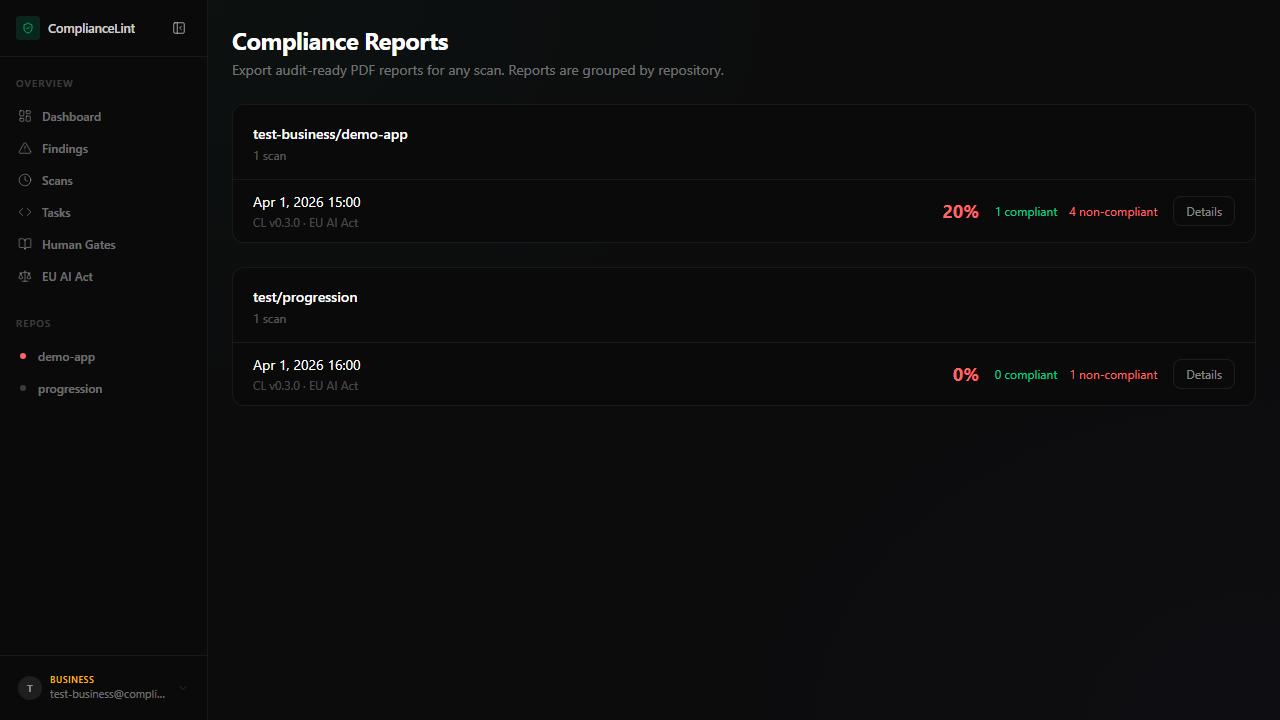
What you'll see: Compliance Reports page with each repository grouped — repo name + scan count, then one row per scan showing scan timestamp, ComplianceLint version, regulation tag, compliance score, compliant + non-compliant counts, and a Details button. Generation typically takes 5-30 seconds depending on evidence volume.
Step 2
The exported zip's structure:
compliancelint-YYYY-MM-DD-<repo-name>.zip
├── manifest.json          — top-level index + SHA-256 of every file
├── scan/
│   ├── scan.json          — full scan envelope (all findings)
│   └── compliance-profile.json — account snapshot at export time
├── evidence/
│   └── <finding-id>/      — one folder per finding with evidence
│       ├── <file-1>.pdf
│       └── ...
├── human-gates/
│   ├── art09.pdf          — Risk Management System submission
│   ├── art14.pdf          — Human Oversight Design
│   └── ...
├── doc.pdf                — Declaration of Conformity (Annex V)
├── tech-doc.pdf           — Technical Documentation cover (Annex IV §1)
└── README.md              — what's inside, how to verify hashes
Every PDF is independently openable; the zip is a convenience wrapper, not a proprietary format.
Step 3
Past exports are listed under /dashboard/reports → Past exports tab — entry per export with timestamp, repo(s) covered, total finding count, total evidence count, and a download button.
The exported zip itself is yours forever: retention only applies to the dashboard's regenerate-on-demand copy. Once you download the zip to your machine / S3 / shared drive, it's no longer subject to dashboard pruning — that's the whole point of an audit-grade snapshot. If a regulator asks for the same version 18 months later, you supply it from your own archive, not from us.
Recommended workflow: download the zip immediately after export, store it alongside your release artifacts (or in a dedicated compliance-archive bucket), and treat the dashboard Past-exports list as a convenience cache rather than a long-term store.
Step 4
The manifest.json at the top of the zip contains:
- Export timestamp (ISO-8601 UTC)
- Scanner version + obligation set hash
- Every file path + SHA-256 hash
- Account fingerprint (so a regulator can verify the export came from a specific organisation's account, not someone else's)
To verify integrity locally:
$ shasum -a 256 evidence/<finding-id>/<file>.pdf
<hash>  evidence/<finding-id>/<file>.pdf

$ jq '.files["evidence/<finding-id>/<file>.pdf"]' manifest.json
<same hash>
If the hashes don't match, the file was modified after export — the manifest is your proof that the regulator received exactly what was generated, not a re-edited version.
Step 5
Recommended export cadence:
Quarterly — minimum for any production system. Captures the compliance state at known intervals; useful for board reporting and audit trail continuity.
Pre-release — every time you push a release that touches AI components. Pins the compliance evidence to a specific release artifact.
Pre-regulator-submission — anchors the snapshot you submit; future scans don't change what the regulator was given.
Pre-tier-downgrade — downgrade may prune older scans from the dashboard; export FIRST so the historical evidence isn't lost. (The export retention is tier-based but the LOCAL zip is yours forever.)
Future: scheduled auto-export (Business+, planned 2026 Q2). Until then, run manually on a calendar reminder.
What can go wrong
- Export job stays "in progress" for more than 5 minutes — Large evidence volumes (>200 MB) take longer. The progress indicator updates every 10s. If it really hangs (no update for 2+ minutes), refresh the Reports page — the server-side job is tracked separately, refresh re-attaches the UI without canceling. Persistent hangs > 10 min: open a support ticket including the export job id from the URL.
- Downloaded zip won't extract / shows corruption — Network truncation during download. Re-download from the Past exports list (the same export can be re-downloaded as long as it's within the tier retention window). If multiple re-downloads all corrupt, check your browser's download settings (some block .zip with PDF inside as "suspicious"). Curl as a fallback: the Past exports list shows each entry's API URL.
- Manifest hashes don't match the file contents — Either the file was modified after export, OR the file was extracted with line-ending normalisation (some Windows zip tools convert LF → CRLF in TXT/MD files). Re-extract with a tool that preserves bytes (e.g.
unzip -Kon macOS / Linux, 7-Zip with the "keep file modification" option on Windows). If hashes still don't match, the export itself is suspect — regenerate from Reports.
Related
Last updated: 2026-08-11