Regulation Updates — staying current with EU AI Act changes
For: all
Tier: free+
Time: ~4 min
Why you'd do this
The EU AI Act is not a static target — Annex updates, Commission delegated acts, and guidance documents from the AI Office change what's required and how. The Regulation Updates page is the in-platform feed: when an obligation set version changes, what new obligations appear, how it impacts your existing scans. Subscribing to the digest avoids the situation where a re-scan suddenly shows 5 new NC findings without you knowing the underlying obligation set moved.
Before you start
- Logged-in account on any tier (free sign-up unlocks the timeline)
- Optional: at least one synced scan so impact-against-your-scans rendering has data to work with
Step 1
Open /dashboard/regulation-updates from the user-menu. The page shows entries in reverse-chronological order, each entry being one obligation-set version bump. Each entry includes:
- Date + version (e.g.
obligations-v2.4.0released 2026-04-15) - Source — EUR-Lex citation, Commission act number, AI Office guidance reference
- Summary — 1-2 sentences of what changed
- Affected articles + obligation count delta
- Impact on your repos (Business+) — count of your scans that would change status under the new set
- Apply button — moves your account to the new obligation set (default: applied automatically on the next scan)
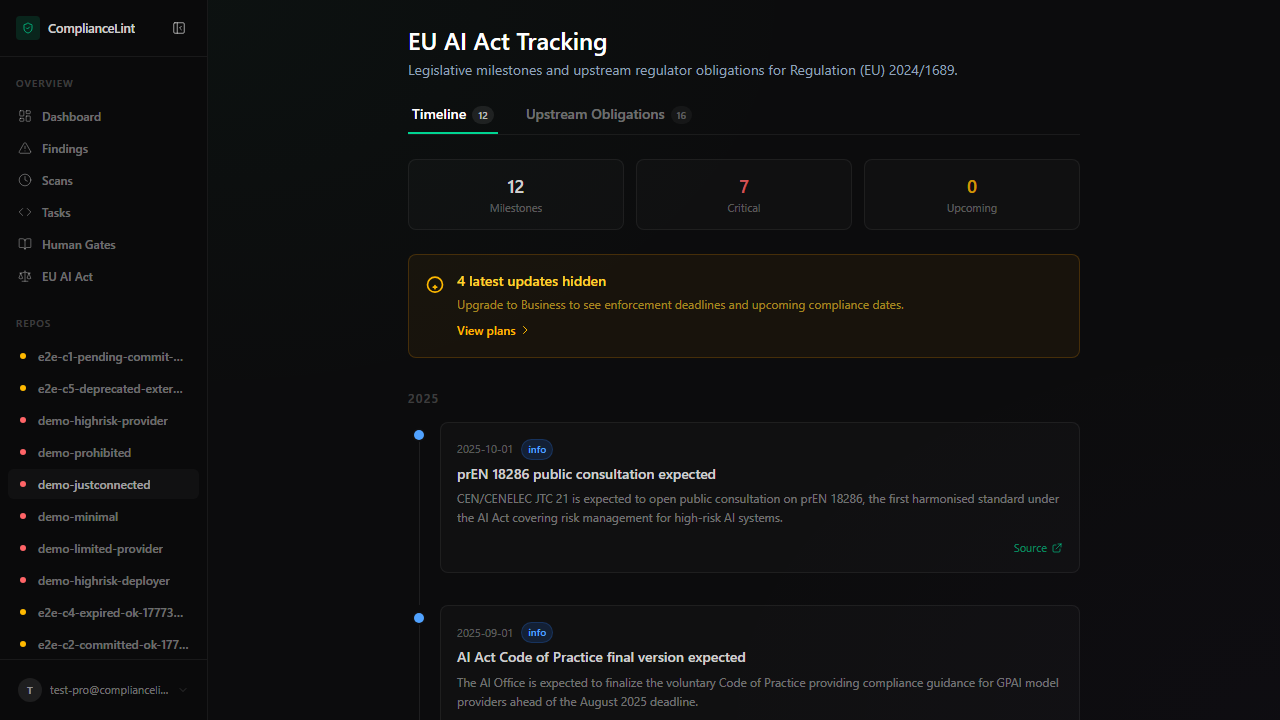
What you'll see: EU AI Act Tracking page with two tabs: Timeline (19 milestones) and Upstream Obligations (10 entries). Three summary tiles at the top — total Milestones, Critical, Upcoming. Body lists entries in reverse-chronological order, each with date + critical/high/info severity + title + summary + linked source. Open to all tiers (post §2.AF 2026-05-05); the Business+ differentiator is the email/push notification digest (roadmap), not page access.
Step 2
Click any entry to open its detail pane:
- Verbatim diff — for each affected article, side-by-side old vs new text (EUR-Lex source). Bold highlights show what changed phrase-by-phrase.
- New obligations introduced — list with id + brief title; click any to expand the obligation atom and reasoning.
- Removed obligations — same format; rare but happens (e.g. delegated acts narrowing a previously-broad obligation).
- Re-classified obligations — same id but changed addressee or deontic type (e.g. "shall" → "may").
- Migration note — if behaviour change is non-trivial, an explainer paragraph from the regulation specialist who decomposed the update.
Step 3
Business+ tier: every entry shows "Impact on your repos" with:
- Repos affected — how many of your repos have findings touching the changed articles
- Predicted status changes — counts for each transition ("3 findings would move COMPLIANT → NC", "5 findings would move NC → NA")
- Why — short reasoning per repo. Click for the full impact report.
The impact estimate uses your CURRENT scans + the new obligation set, simulating a re-scan. Actual values after re-scan may differ if your code changes between now and re-scan, but typically the prediction is accurate within ±5%.
Step 4
Two ways an update gets applied:
Auto-apply on next scan (default) — the next scan uses the latest obligation set. No action required. The dashboard shows a yellow "Obligations updated" banner on the first scan after each update so you know the comparison baseline shifted.
Manual apply — click "Apply now" on the entry. Re-evaluates ALL of your latest scans against the new set without requiring a re-scan. Useful for instant impact assessment, especially when the impact preview shows large status moves and you want to act before the next code change clouds the analysis.
Pin to specific version (Enterprise) — locks a repo to a specific obligation-set version. Useful for fixed-scope regulator submissions ("this audit assessed against v2.4.0 specifically"). New updates surface but don't auto-apply to pinned repos.
Step 5
Two out-of-platform notification options:
Email digest — weekly summary on your registered email. Opt-in via Settings → Email preferences → "Regulation updates digest". Includes top 3 updates with brief impact stats.
RSS feed — every account has a private RSS URL listing all updates. URL is shown at the bottom of /dashboard/regulation-updates. Plug into Slack / Teams / Feedly for team-wide notification flows.
Both contain only PUBLISHED updates (post review by our regulation specialist). Drafts in our internal pipeline don't appear — every entry on the page is one we're confident interpreting.
What can go wrong
- After an auto-applied update, my COMPLIANT findings flipped to NC and I don't know why — Open Regulation Updates and find the update entry around your re-scan date. The detail pane explains what changed in the obligation set. If a finding flipped because the obligation now requires evidence that your scan didn't pick up, the resolution is the same as any new NC: upload evidence or attest. No data loss happened — the finding's evidence is still attached, the SCANNER's judgment of its sufficiency changed.
- Impact estimate said "15 findings affected" but actual re-scan shows 3 changes — Estimates assume your code stays static. If code changed between estimate-time and re-scan-time (new commits, new evidence uploaded, etc.) the actual count diverges. Re-open the Regulation Updates entry — the impact estimate refreshes after your latest scan, so the next visit shows updated numbers.
- Email digest never arrives even though I opted in — Digests are weekly, sent Mondays UTC. If it's Wednesday and you opted in Tuesday, the next digest is the following Monday. Check spam — sender is
noreply@compliancelint.dev. If you've missed multiple consecutive Mondays, the email may be bouncing — check Settings → Email preferences for a bounce warning at the top of the card.
Related
Last updated: 2026-08-11