Setup checklist — the 6-step onboarding flow
For: all
Tier: free+
Time: ~6 min
Why you'd do this
After sign-up, ComplianceLint redirects you to a 6-step checklist until you skip or complete enough steps. The page is more than a tour — completion of specific steps unlocks features. Knowing what each step gates helps you decide which to prioritise vs. skip.
Before you start
- Logged-in account (the page redirects unauthenticated users to sign-in)
- Awareness that you can SKIP the checklist via "Skip for now" at the bottom — onboarding doesn't gate access to dashboard pages, it just suppresses the checklist redirect for return visits
Step 1
The full checklist:
- Connect a repository — ask your AI: "Set up ComplianceLint for this project"; first repo paired completes this step
- Run the Profiling Wizard — answer the wizard's questions to filter out obligations that don't apply to your AI system (see chapter Profiling Wizard deep dive)
- Run your first scan — ask your AI to scan your project; the scan produces findings
- Fix a finding and re-scan — close one NC finding via evidence upload + re-scan to see it move to COMPLIANT
- Complete a Human Gate questionnaire — fill at least one structured questionnaire (e.g. Art. 9)
- Resolve your first finding — formally attest or close one finding via the action surface
Each row shows progress (gray circle → emerald checkmark) and expands to a how-to with a deep-link to the relevant page / MCP command. A "Skip for now" link at the bottom dismisses the checklist redirect permanently for the account.
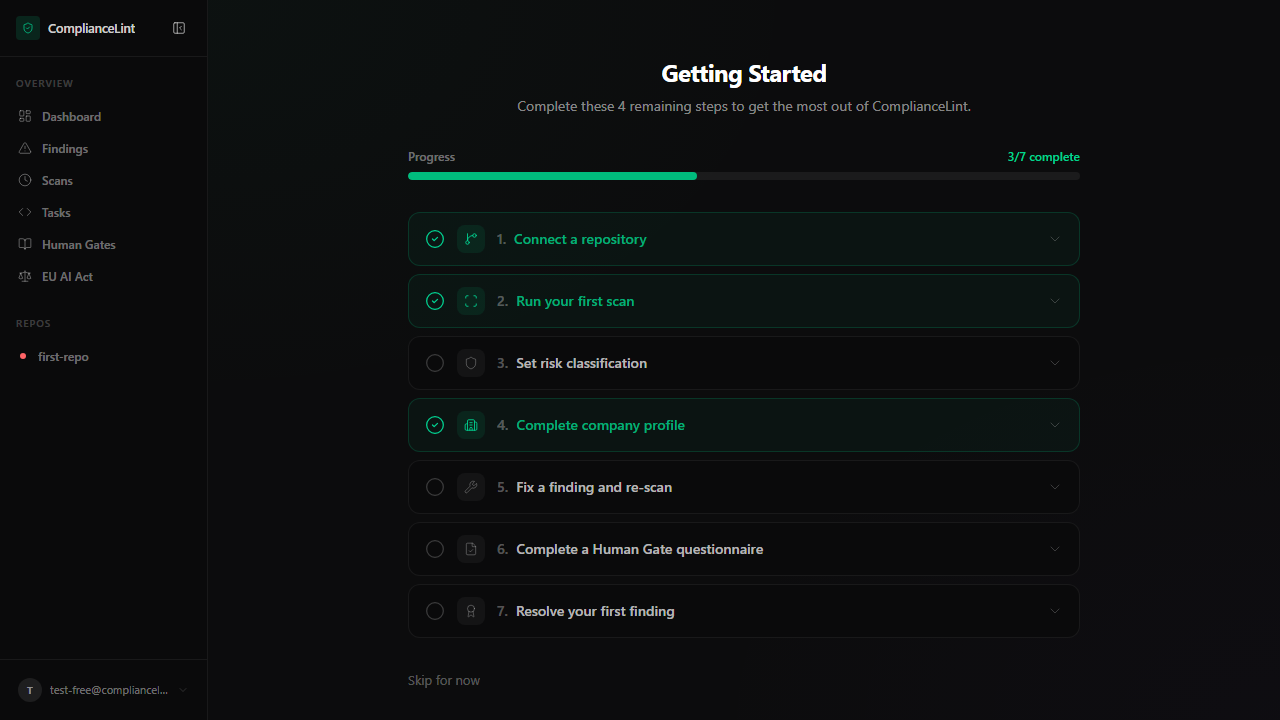
What you'll see: 6 numbered cards in collapsed state by default — click any row to expand its how-to. Completed cards (gray check) appear with muted text; the next-to-do card carries a subtle accent. Progress bar at the top shows X of 6 complete.
Step 2
By default, signing in redirects to /dashboard/getting-started until the account state crosses one of two thresholds:
- At least 1 of 7 steps completed — redirect stops; user lands on
/dashboarddirectly - "Skip for now" clicked — sets
onboardingSkipped = 1in the database; redirect stops permanently for that account
After the redirect stops, the checklist itself still lives at /dashboard/getting-started (linked from the user-menu). You can re-visit any time to complete remaining steps.
Skipping does NOT prevent feature use — every dashboard page remains accessible. The redirect is purely first-time-user guidance.
Step 3
Step 3 ("Set risk classification") is the only step that can be completed in TWO ways:
- Accept scanner's classification — open the repo overview, click "Confirm classification" on the AI/Human risk banner. Marks human-classification = scanner-classification.
- Override — open Repo Settings → Risk Classification, pick a different value. Either approach completes the step.
The step exists because regulator submission requires a HUMAN decision on classification — the scanner's verdict is evidence, not the legal classification. Confirming OR overriding both represent a human decision.
Step 4
Step 6 ("Complete a Human Gate questionnaire") is the most involved step — Human Gates Fill is Pro+. Free / Starter accounts see the step listed but the action shows an upgrade prompt; the step doesn't auto-complete on lower tiers.
Completion criterion: ANY one questionnaire submitted (not all questionnaires). Once you submit your first Human Gate, the step ticks even if other articles still have open questionnaires.
Most users start with Art. 9 (Risk Management) or Art. 14 (Human Oversight) since those are the highest-frequency high-risk obligations.
Step 5
"Skip for now" at the bottom — accepts that you're not going to complete the checklist this session. Sets the database flag; future sign-ins land on /dashboard directly.
"Reset onboarding" (Settings → Account, Pro+) — clears the skip flag + step completions for re-onboarding. Useful when showing the platform to a teammate or after a major UI rework. Does NOT delete data — only the onboarding state.
Implicit completion — the checklist watches your activity. If you complete a step's actual action (e.g. ask your AI to scan) without opening the checklist, the step still ticks the next time you visit /dashboard/getting-started.
What can go wrong
- Connected the repo but step 1 still shows as not done — The checklist re-fetches state on page load, not real-time. Refresh the page — step 1 should tick. If still not ticked, check that the sync completed after pairing (the dashboard sees your repo through the synced state, not the MCP-side
.compliancelintrcdirectly — ask your AI to sync if you haven't yet). - Step 6 (Human Gate) won't complete even though I'm Pro and submitted Art. 9 — Step completion checks for at least one Human Gate submission with status
Done(signed off). If you saved sections but didn't click "Submit for review" on the final section, the questionnaire is still "In progress" not "Done". Open the Tasks page → find Art. 9 → check status. "In progress" needs the Submit click to finalise. - Reset onboarding didn't bring back the redirect on next sign-in — Reset clears the skip flag AND step completions. If you're now signed back in and seeing
/dashboarddirectly, your account state must already satisfy the "at least 1 step" threshold (e.g. you have a connected repo from before reset). The reset doesn't UN-DO the underlying actions, only the checklist state. To force the redirect, you'd have to also disconnect every repo, which is rarely worth it.
Related
Last updated: 2026-08-11