Profiling Wizard — the questions that hide irrelevant obligations
For: all
Tier: starter+
Time: ~6 min
Why you'd do this
The EU AI Act decomposes into 247 obligations across 44 articles. Most projects only touch a fraction of them. The Profiling Wizard asks guided questions about your AI system + your organisation's role(s) + any scope carve-outs, then auto-marks irrelevant obligations Not Applicable so the dashboard only shows what you can act on. Average reduction across our test fixtures is ~64% of obligations filtered out without false negatives.
Before you start
- Starter+ tier (free tier sees the entry but the wizard renders an upgrade prompt)
- OWNER role on the repo (members see the wizard read-only)
- Clarity on your AI system: is it a chatbot, an internal classifier, a generative model, embedded in a regulated product, etc.?
- Clarity on your organisation's relationship to the AI: are you the one who built it (provider), the one using it (deployer), reselling it (distributor), bringing it across the EU border (importer), the EU contact for a non-EU provider (authorised representative), or integrating it into your own physical product (product manufacturer)?
Step 1
Two ways to enter:
- Repo dashboard banner — emerald "Run Wizard →" CTA appears when the repo has no wizard answers yet
- Settings → AI System Profile — Run Wizard button at the top-right of the AI System Profile section (next to the section title)
Both lead to /dashboard/repos/<id>/profiling-wizard. The wizard is per-repo, not account-wide — different repos can have different role configurations (e.g. one repo where you're a Provider, another where you're a Deployer).
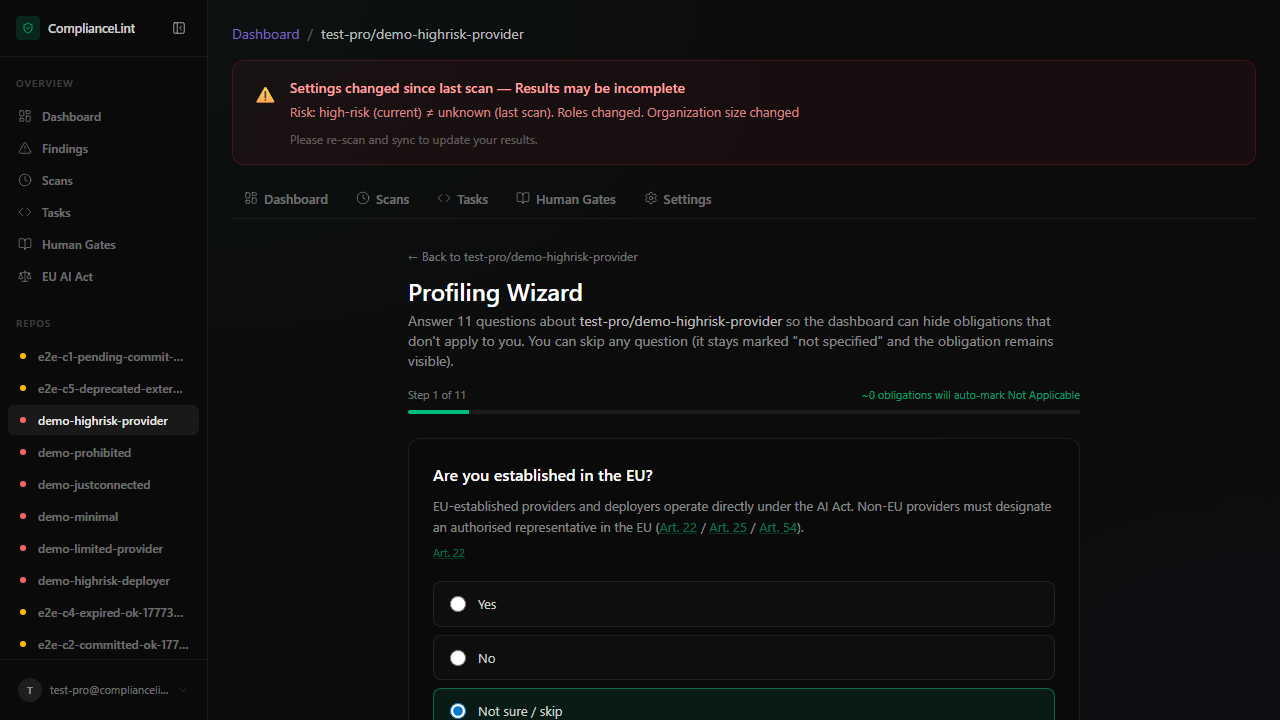
What you'll see: A single-page form with three section headers — About this AI system, Your organisational roles, Scope carve-outs — and a progress chip showing how many of the visible questions you have answered.
Step 2
The wizard starts with about a dozen questions describing the AI system itself. Each is a single click; you can also pick "Not sure / skip" to leave it open. Skipping keeps the related obligations visible (safe default).
The key questions in this section:
- AI system name — defaults to your repo name; this is the name that appears on your Declaration of Conformity (Annex V §2). Edit if you have a customer-facing product name that differs from the repo.
- Risk classification — Prohibited (Art. 5) / High-risk (Art. 6, Annex III) / Limited-risk (Art. 50) / Minimal-risk. Use the inline guide if unsure.
- Established in the EU — drives Art. 22 (non-EU providers must appoint an EU representative).
- Annex III category — eight high-risk use cases: biometrics, critical infrastructure, education, employment, essential services, law enforcement, migration, justice. Pick the one closest to your use case, or "Not in Annex III" if none apply.
- Art. 6(3) derogation (visible only if you picked an Annex III category) — for systems that fall under Annex III but qualify for the narrow Art. 6(3) carve-out (narrow procedural task, decision improvement, etc.).
- Annex I safety component — if your AI is integrated into a regulated product (medical device, machinery, etc.), the product's sectoral conformity assessment applies.
- Training / validation / test data — routes Art. 10 (data governance). Rule-based or expert-system AI without statistical training answers No.
- Generates synthetic content — triggers Art. 50 transparency duties (mark output as AI-generated, deepfake disclosure). Generative AI = Yes; classifiers / detectors = No.
- General-purpose AI model (GPAI) — adds Art. 51-55 (model documentation, downstream provider info). Foundation models = Yes; narrow-task models = No.
- GPAI with systemic risk (visible only if GPAI = Yes) — Art. 51(2) designation based on training compute (≥ 10²⁵ FLOPs) or Commission decision.
Step 3
This section asks, separately for each of the six EU AI Act roles, (a) whether you legally fall into that role at all, and (b) only if you do, whether the AI system you handle in that role is high-risk in practice. The two-step structure matters because the same organisation can legally be (say) a Deployer of low-risk AI tools without triggering Art. 26/27 deployer obligations — those only apply when the AI you deploy is itself high-risk.
For each role, the wizard asks the legal-definition question first; the operational follow-up appears only if you answered Yes:
- Deployer (Art. 3(4)) — any organisation using an AI system under its authority (excluding personal non-professional use). Most B2B users answer Yes here, even if they only use ChatGPT or Copilot internally.
- Follow-up: Do you deploy any high-risk AI system? — triggers Art. 26/27 deployer obligations only if Yes.
- Importer (Art. 3(6)) — EU-established organisations placing a non-EU vendor's AI on the EU market.
- Follow-up: Is the imported AI high-risk? — triggers Art. 23 only if Yes.
- Distributor (Art. 3(7)) — resellers, marketplaces, channel partners.
- Follow-up: Is the distributed AI high-risk? — triggers Art. 24 only if Yes.
- Article 25 value-chain responsibilities — single question covering trademark rebrand / substantial modification / integration into product (Art. 25(1)/(2)/(3)/(4)) that shift you into the Provider role for the modified system.
- Authorised Representative (Art. 3(5)) — EU-established contact for a non-EU provider.
- Follow-up: Is the represented provider's AI high-risk? — triggers Art. 22 OBL-3 only if Yes.
- Product Manufacturer (Art. 2(1)(e)) — you integrate AI into your own product under your own brand. Product Manufacturer has no high-risk follow-up — Art. 25(3) treats Product Manufacturer as provider for any AI integrated into the product (the wizard preserves Chapter III provider obligations even if you answered the system isn't high-risk).
Step 4
Five questions that may put your system entirely outside the EU AI Act's scope (Art. 2 exemptions):
- Meets Art. 3(1) AI-system definition — five elements: machine-based, autonomous, may adapt, infers outputs, outputs influence environments. If your system fails any element, the entire Regulation does not apply.
- Territorial scope (Art. 2(1)) — Act applies when the system is placed on the EU market OR the deployer is in the EU OR the output is used in the EU. False = entire Act inapplicable.
- Military / defence / national security (Art. 2(3)) — exclusive use → entire Act inapplicable.
- Scientific research and development before market placement (Art. 2(6)) — exclusive R&D use → entire Act inapplicable.
- Free and open-source licence (Art. 2(12)) — Title III obligations auto-NA except Art. 4 / Art. 5 / Art. 50 / Art. 51-55.
The first four are "full Act-disabling" carve-outs; the open-source one is article-level. Use carefully — these are narrow legal exemptions, not "I just want fewer findings".
Step 5
When every visible question has been answered (or explicitly skipped), the Finish button at the bottom activates. The button label shows the count of obligations the wizard will auto-mark Not Applicable based on your answers; a per-article list appears immediately above for transparency.
After clicking Finish, the dashboard returns you to the repo overview with the obligation matrix narrowed. The changes apply to your LATEST scan immediately (no re-scan needed) — applicability is derived at read time from your answers + the current finding set.
Re-opening the wizard: the wizard is always available from the same entry points (banner or Settings → Run Wizard). When you re-open after a previous Finish, every question renders at once with all your saved answers pre-filled — no need to click through from question 1. Change any answer and the impact recalculates immediately. Click Finish again to save.
If you previously skipped a question with "Not sure / skip", the skip is preserved — that radio appears selected on re-entry, not blank.
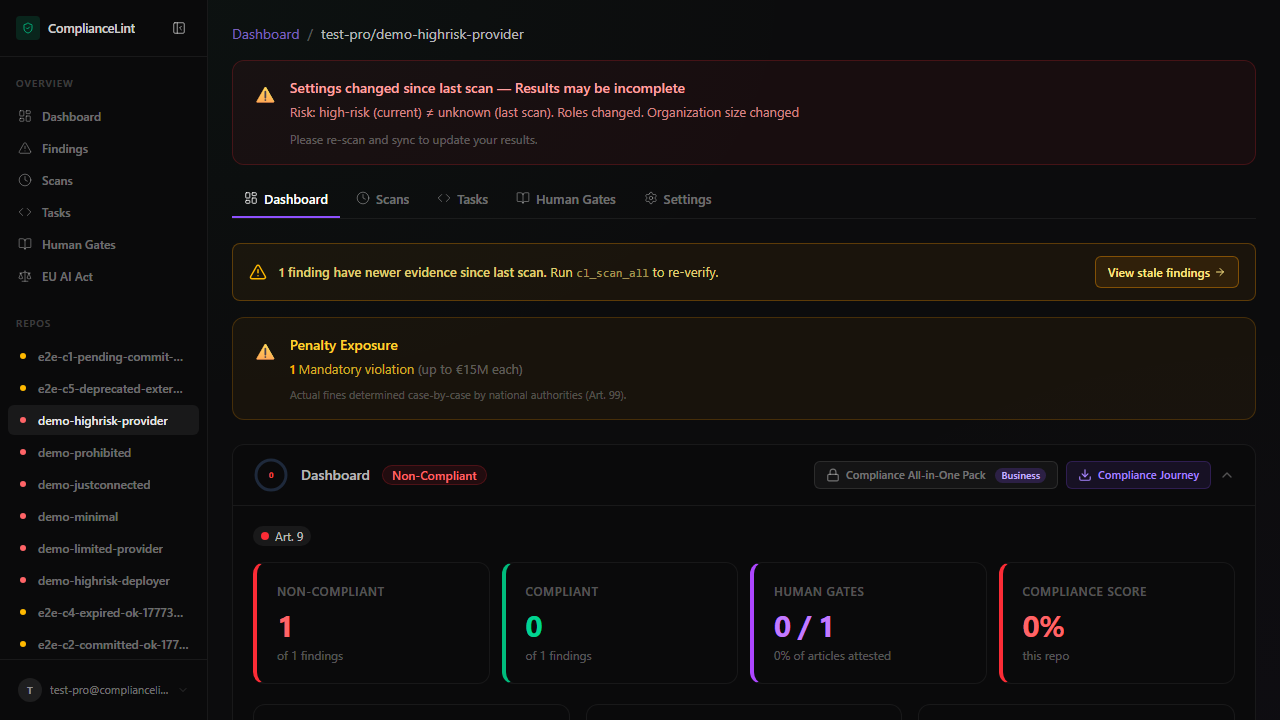
What you'll see: Repo overview after wizard completion: KPI counts now reflect the trimmed obligation set, the AI System Profile section shows a read-only summary of every answer, and a green "Compliant" badge appears if no in-scope obligations are failing.
What can go wrong
- Wizard shows "upgrade required" even though I'm on the Pro plan — The wizard checks your account's CURRENT plan. If you just downgraded then re-upgraded, the cached tier may be stale — sign out and back in to force a tier-cache refresh. If still blocked, your account may have been put into a
subscription_status: past_duestate (open Settings → Billing to verify). - After running the wizard, a finding I expected to see disappeared — That's the wizard working — your answers indicated the obligation doesn't apply. To verify: open the repo's Settings → AI System Profile, find the relevant answer in the read-only summary, and confirm it reflects what you intended. If you disagree, click Run Wizard, change the corresponding answer to "Not sure / skip", and Finish again — the obligation will reappear.
- A red banner says "Wizard answer inconsistency — your Declaration of Conformity or filing export would be legally invalid" — Your answers contain a logical contradiction the EU AI Act would not accept (e.g. you marked the system as high-risk but picked "Not in Annex III" and "Not an Annex I safety component"). Click the "Open Profiling Wizard" link in the banner to fix the contradicting answer. Until fixed, the Declaration of Conformity PDF export is blocked.
- The questions don't seem to cover my situation — The wizard covers EU AI Act applicability — it doesn't model GDPR, NIS2, ISO 42001, or other adjacent regimes. If your compliance need is broader, ComplianceLint scopes its own surface but doesn't suppress your need to address those other regimes elsewhere. "Not sure / skip" leaves obligations visible if you'd prefer to make the call case-by-case.
Related
- compliance-profile-setup
- concept-primer
- persona-provider
- persona-deployer
- persona-product-manufacturer
Last updated: 2026-08-11