Findings page — your cross-repo gap triage view
For: all
Tier: free+
Time: ~4 min
Why you'd do this
The Dashboard counts gaps; the Findings page lets you ACT on them. Every NC / UTD finding across every accessible repo is here — filterable by article, severity, repo, and stale state. The deduplication-by-obligation grouping option turns scattered finding rows into a worklist of distinct compliance gaps to close.
Before you start
- At least one synced scan with NC / UTD findings (a clean account shows the empty state)
Step 1
Open /dashboard/issues (also reachable as "Findings" in the sidebar — same page). Default view: every NC + UTD finding across every repo, newest first. Each row carries:
- Status pill (red NC / amber UTD)
- Article + Obligation id (e.g. Art. 9 / ART09-OBL-2c)
- Title — short human-readable summary
- Repo — where the finding lives (clickable)
- First seen — when this obligation first showed NC across any scan in this repo (helps spot persistent gaps)
- Stale dot — if any attached evidence has gone stale
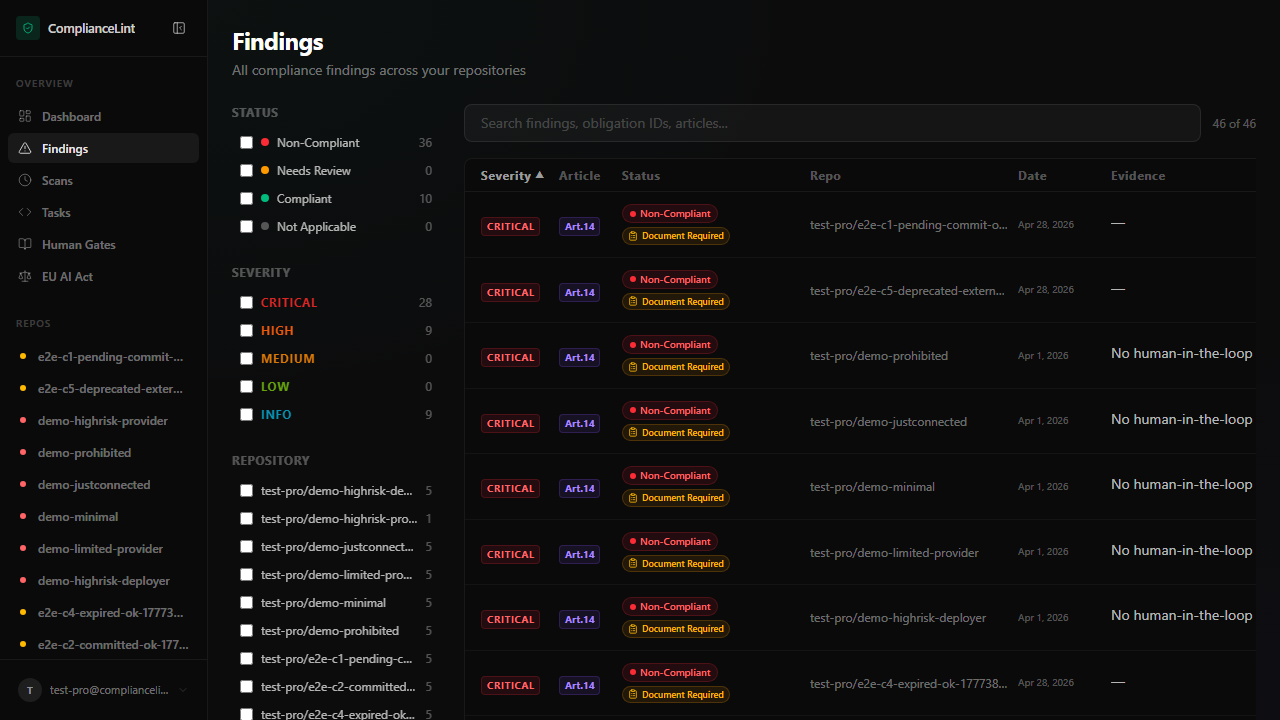
What you'll see: Findings table with ~10-50 rows depending on your fixture, filter row above, summary chips at top showing count by status.
Step 2
The filter row supports:
- Article (multi-select chip) — narrow to specific articles (e.g. "only Art. 9 + Art. 14 risk + oversight findings")
- Repo (multi-select)
- Status — NC / UTD / both
- Is stale — finding has at least one stale evidence item
- Persona-relevant — show only findings actionable for the current repo's roles (uses the wizard answers)
Filters compose with AND. The URL updates per filter so views are bookmarkable; useful for team workflows where one engineer owns Art. 9 findings and another owns Art. 14.
Step 3
Clicking any row opens the corresponding scan-detail page jumping to that finding's expanded panel (anchor link with the finding id). All actions described in scan-detail-page are available there — upload evidence, attest, mark NA, etc.
Right-click a row for additional actions:
- Copy link — shareable URL
- Group by obligation — toggles the page into worklist mode (see step 4)
Step 4
Toggle Group by obligation in the filter row to switch from "every finding" to "distinct unresolved gaps". The same obligation appearing on 5 repos collapses to one row showing "5 repos affected". Click expand for the per-repo breakdown.
This view is the recommended triage starting point for teams managing multiple repos with similar tech stacks: closing one obligation (e.g. "upload FMEA") often resolves multiple findings at once if the same evidence applies across repos.
Step 5
Export current view (Pro+) — download the visible filter set as CSV / JSON. Useful for offline triage, regulator submissions, or pasting into team chat as a worklist.
Bulk Mark NA (Pro+) — select multiple rows via checkbox + apply a single NA reason to all. Common use: a Provider repo that needs to mark all Importer-addressed obligations NA in one shot. Reason is applied uniformly; the audit trail records the bulk action with the row count.
Free / Starter see the bulk select but actions show upgrade prompts. Per-row NA always works on every tier.
What can go wrong
- Findings page shows 0 results but I know I have NC findings somewhere — Check filters — the default
Persona-relevant: onfilter hides findings whose addressee doesn't match the repo's roles. If a Provider repo has Importer-addressed findings and you have NO wizard answers, those are filtered out. Toggle Persona-relevant OFF to see everything; or re-run the wizard with answers that match what you actually do. - Same obligation appears as 3 separate rows even though it should be 1 — Default view shows raw findings (one per repo per scan). Three scans of the same repo with the same NC = 3 rows in the raw view. Toggle Group by obligation to collapse them. If you want per-scan history, the per-repo Scans tab is the better surface.
- Bulk Mark NA succeeds but the reason isn't visible in the audit trail — Bulk actions log under a single audit entry with the count + reason at the action level, NOT per-finding. Open
/dashboard/repos/<id>/audit(Pro+) to see the bulk entry. Per-finding history then references the bulk action id rather than duplicating the reason on every row.
Related
Last updated: 2026-08-11