Tasks page — the human-action queue across all your repos
For: all
Tier: free+
Time: ~4 min
Why you'd do this
Compliance work splits into two flavours: TECHNICAL ("upload an FMEA PDF", "link the data-quality test report") and PROCEDURAL ("fill the Art. 9 risk-management questionnaire", "sign the Declaration of Conformity"). The Findings page handles the technical side; the Tasks page handles the procedural side. Most teams route Tasks to compliance / legal staff while Findings go to engineers.
Before you start
- At least one repo with applicable Human Gate articles (typically any high-risk or limited-risk classified repo)
- Pro+ tier to actually FILL questionnaires (free / starter sees the task but the open-form button shows an upgrade prompt)
Step 1
Open /dashboard/todos (labelled Tasks in the sidebar). The list shows every open Human Gate task across every repo, with tabs to switch grouping (All / By Severity / By Repo). Each task row shows:
- # — row index
- Severity — CRITICAL / HIGH / MEDIUM / LOW / INFO badge
- Article — Art. number badge linking to the article viewer
- Task — short imperative (e.g. "Establish a risk management system"), plus a Human Gates badge when the task is a questionnaire-fill
- Findings — bar showing how many findings this task closes (click to see them on the Findings page)
- Repos — number of repos this task spans
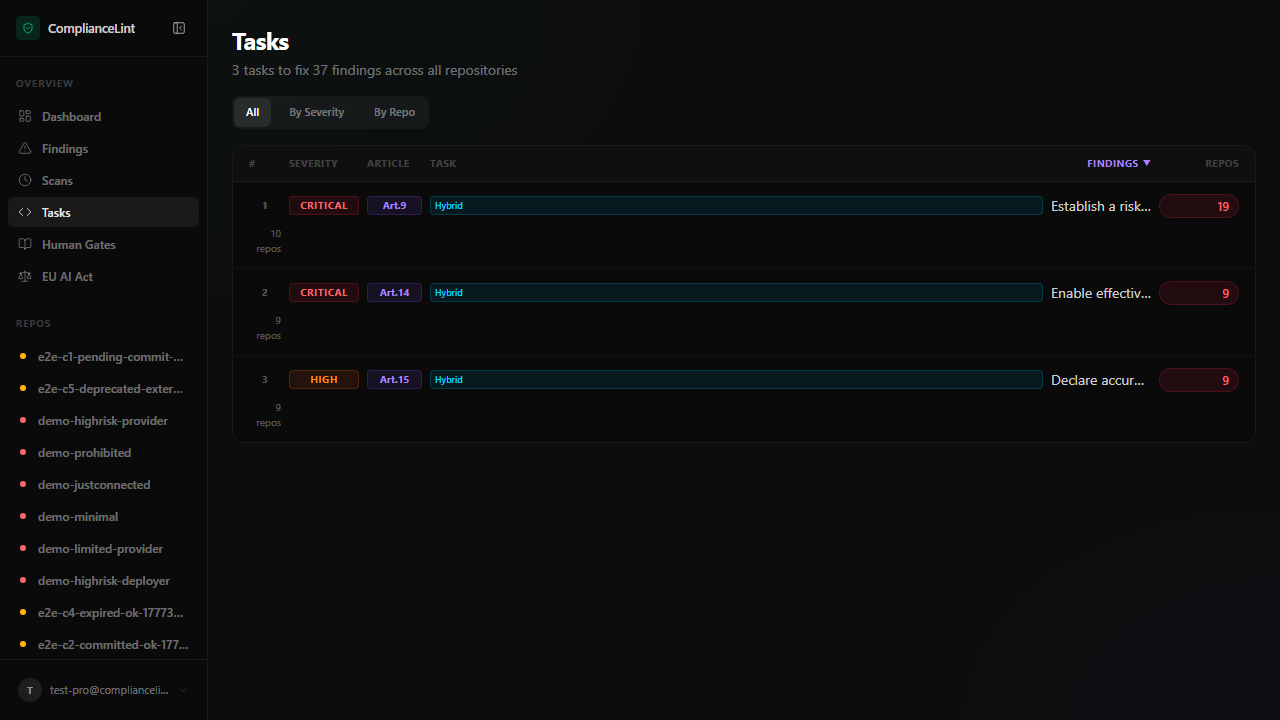
What you'll see: Task list with tab selector (All / By Severity / By Repo). Articles your repo's roles don't address are filtered out by default (e.g. a Provider-only repo won't see Importer Art. 23 tasks).
Step 2
From a repo overview, the Tasks tab shows only that repo's tasks. Same row format as the cross-repo view; the Repos column then always reads 1 repo. Useful when one engineer is responsible for the compliance of one specific product.
URL anchors: ?expand=art9 opens the page with the Art. 9 task row pre-expanded — handy for sharing direct links to a specific questionnaire.
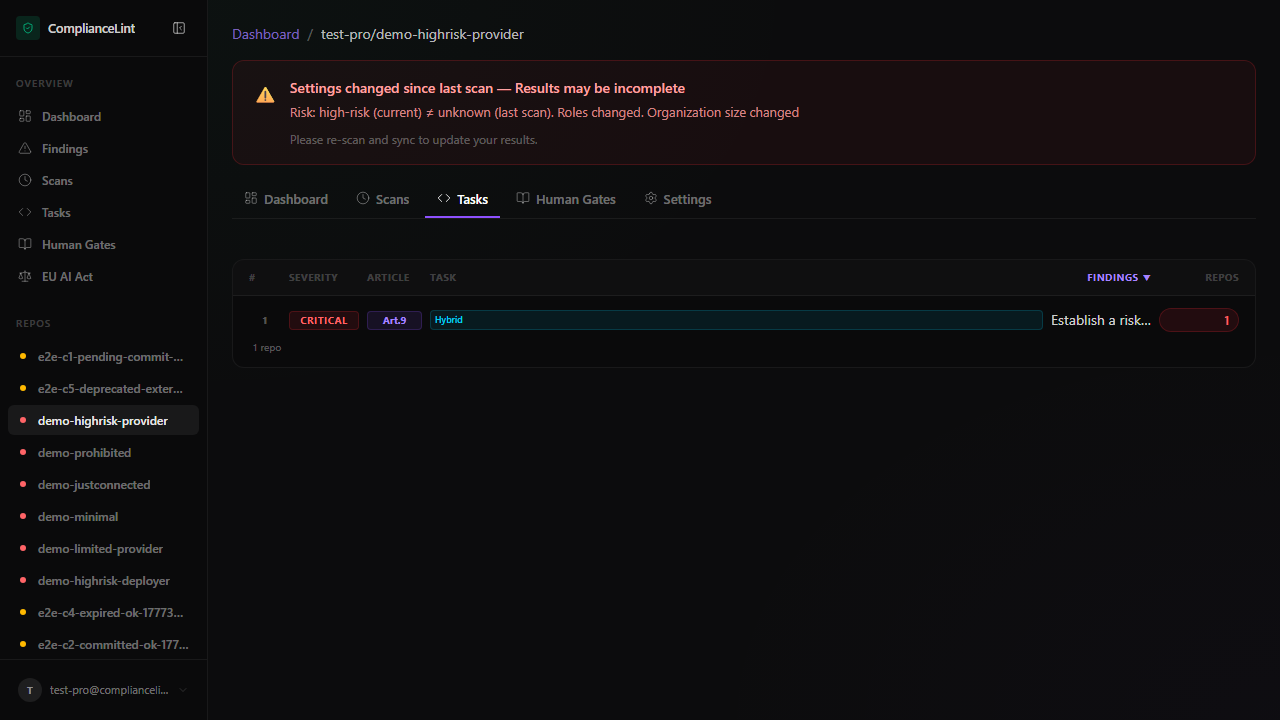
What you'll see: Per-repo task list with the Tasks tab highlighted in the repo navigation row.
Step 3
Each task carries a status pill describing where you are in the questionnaire flow:
- Not started (gray) — questionnaire opened 0 times
- In progress (amber) — at least one section saved, not all complete
- Pending review (blue) — all sections complete, awaiting designated reviewer sign-off (multi-person workflows, Pro+)
- Done (emerald) — all sections complete + signed off; the associated Art. X finding moves to COMPLIANT on the next scan
- Stale (red dot overlay) — Done but underlying scan/data has changed; needs re-review
Tasks remain on the page across re-scans — completion state is preserved in finding_responses storage, which the scanner reads rather than re-asking the same questions every run.
Step 4
Pro+ tier exposes the multi-author audit trail per task. Expanding a task row shows:
- Section-by-section progress with the user who completed each
- Comment thread per section (engineering / compliance back-and-forth without leaving the platform)
- Sign-off field with role-restricted signature (only designated reviewers can complete)
The audit trail is appended-only — edits are versioned, not overwritten. Regulators reading the exported PDF can see who answered what and when.
Step 5
Mark as not applicable (Pro+) — for tasks corresponding to obligations your repo profile rules out. Selecting a task and clicking "Mark NA" opens the same reason picker as on Findings ("role doesn't apply" / "derogation X" / etc.). The task leaves the active list and the underlying obligation moves to NA on the next scan.
Export task list (Pro+) — CSV / Markdown of current view for offline triage or insertion into a Jira / Linear board.
Reassign (Business+) — assign a task to a specific team member; they get notified and the task appears bolded in their Tasks page until completed.
What can go wrong
- Task progress shows "3/19 sections" but I'm sure I filled more — Sections track completion at SAVE time. If you filled fields but didn't click Save on the section, progress doesn't advance. Re-open the task — fields are preserved (autosave drafts) but section completion only counts after explicit Save. The page header shows "Unsaved changes" if drafts exist.
- A task shows "Done" but the related Art. X finding is still NC — Scanner reads completed questionnaires on the NEXT scan, not instantly. Ask your AI to re-scan and sync after completing a task. If the finding is STILL NC after re-scan, open it — the scanner may have noted a specific section answer that doesn't satisfy the obligation (e.g. "residual risk treatment description too brief"). Update that section and re-sync.
- I marked a task NA but it keeps re-appearing after every scan — NA on a task targets a specific obligation. If the underlying scan is generating NEW findings for the same article (e.g. you added new code that triggered a different obligation in the same article), the new finding shows as a new task. Open the expanded view to see the obligation id — if it's different from what you marked NA, it IS a different task.
Related
Last updated: 2026-08-11