Settings — API keys, email preferences, account deletion
For: all
Tier: free+
Time: ~4 min
Why you'd do this
Three different "settings" pages exist (Compliance Profile, Repo Settings, this one). This page handles the things specific to YOU the user: which IDE pairings have your API key, what emails you get, which compliance profile to surface from this account, and how to delete the account if you're leaving.
Before you start
- Logged-in account (no anonymous access to this page)
Step 1
User-menu → Settings opens /dashboard/settings. The page groups into 4-5 stacked cards:
- Account — your email (sign-in identity, read-only) + current Plan badge + Member-since date
- Compliance Profile — entry-card with "Open Compliance Profile" button, linking to the shared Compliance Profile page (covered in its own chapter)
- Onboarding — link back to the Getting Started checklist so you can revisit any skipped onboarding step
- API Keys — list of paired IDE keys with last-used date + revoke buttons
- Danger Zone — account deletion + data export request
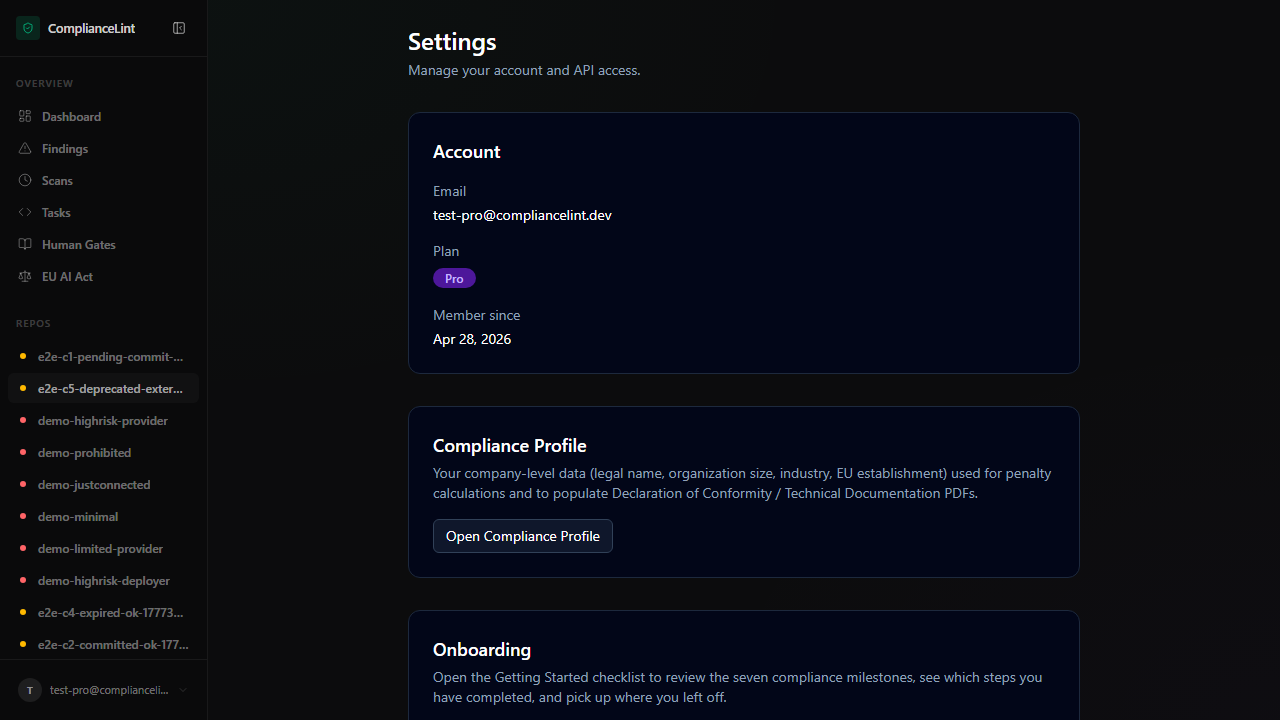
What you'll see: Settings page with cards stacked vertically. Card-titles are clear; the Danger Zone card has a red border to signal irreversibility.
Step 2
API Keys card lists every active pairing — each row shows:
- Label — the IDE name (auto-detected on first pairing, user-editable)
- Created — first pairing timestamp
- Last used — most recent sync or scan from this IDE
- Source IP (Pro+) — last sync's source IP for anomaly detection
- Revoke — button; revokes the key immediately. Subsequent MCP calls from that IDE return 401 / unauthorized
Generate new key button at the bottom — produces a new key in a one-shot reveal modal (key shown ONCE; copy it before closing). Use for re-pairing after a fresh OS install or rotating compromised keys.
Best practice: one key per IDE. Don't share keys across machines — last-used / IP tracking only meaningful when each pairing is unique.
Step 3
Per-event opt-in toggles:
- Scan summary digest — weekly summary of all your scans + deltas. Off by default.
- Critical findings — immediate email when a scan finds a PROHIBITED-class violation. ON by default — recommend keeping on; prohibited-class is rare but actionable.
- Stale evidence reminders — email when evidence is within 7 days of TTL expiration. Off by default; useful for teams managing many repos.
- Regulation updates digest (Business+) — weekly summary of EU AI Act changes affecting your scanning result. Off by default for Business; the in-dashboard view always shows them.
- Product news — release notes, new features. Off by default; we don't believe in marketing emails as default-on.
All emails carry a one-click unsubscribe at the bottom; the preference syncs back to this page.
Step 4
Under Danger Zone, the Request data export button generates a complete download of every record associated with your account — scans, evidence files, attestations, audit log, billing history. This is the GDPR Article 15 right-of-access fulfillment.
Difference from Compliance Time Capsule: the Time Capsule is REGULATOR-facing (one repo's compliance state). The data export is YOU-facing (everything ABOUT you across the platform).
Process: click → confirms via the registered email → backend job assembles the bundle (typically 30 min - 24 h depending on data volume) → email arrives with a download link. Link is single-use, valid 7 days.
Step 5
Delete account — three-step confirmation:
- Type your email to confirm intent
- Pick the deletion mode:
- Soft delete — account marked deleted, all data anonymised within 30 days, audit trail preserved (with your name replaced by
<deleted>). Re-creating an account with the same email is allowed. - Hard delete (GDPR Article 17) — irreversible removal of all personal data. Audit-trail entries that legally must be retained (financial / regulatory) keep just the minimum required by law (account id + transaction id).
- Soft delete — account marked deleted, all data anonymised within 30 days, audit trail preserved (with your name replaced by
- Sign-out + final confirmation. Effective immediately.
Before deleting: download the data export (above) AND any Compliance Time Capsules you want to keep — once deleted, regenerating them is impossible.
Active subscription? Cancellation processes alongside deletion. Pre-paid annual subs are NOT refunded on user-initiated deletion (per terms; refund is voluntary cancellation only).
What can go wrong
- Revoked an API key by mistake — how do I get it back? — Revoked keys are gone permanently — no "undo". Generate a new key (button on the same card), then ask your AI to re-pair with the new key (it invokes
cl_connect(switch_account=true)). The new key is saved to the existing.compliancelintrc;project_idstays the same so your scan history isn't affected. - Email preferences won't save — toggle reverts after refresh — Save happens on toggle change (no submit button). If reverting, check browser console for a 4xx response — most common cause is an expired session. Sign out + sign in to refresh the session token, then toggle again.
- Data export email arrives with a download link that 404s — Links expire 7 days after issue. Re-request from Danger Zone (same button). Each request generates a fresh bundle + fresh link. If the link is fresh and STILL 404s, the export job may have failed silently — email
support@compliancelint.devwith your account email.
Related
Last updated: 2026-08-11