Profiling Wizard — the questions that hide irrelevant obligations
For: all
Tier: starter+
Time: ~6 min
Why you'd do this
The EU AI Act decomposes into 255 obligations across 46 articles. Most projects only touch a fraction of them. The Profiling Wizard asks guided questions about your organisation's role(s), the scope of the Act and your AI system, then auto-marks irrelevant obligations Not Applicable so the dashboard only shows what you can act on. Average reduction across our test fixtures is ~64% of obligations filtered out without false negatives.
Before you start
- Starter+ tier (free tier sees the entry but the wizard renders an upgrade prompt)
- OWNER role on the repo (members see the wizard read-only)
- Clarity on your AI system: is it a chatbot, an internal classifier, a generative model, embedded in a regulated product, etc.?
- Clarity on your organisation's relationship to the AI: are you the one who built it (provider), the one using it (deployer), reselling it (distributor), bringing it across the EU border (importer), the EU contact for a non-EU provider (authorised representative), or integrating it into your own physical product (product manufacturer)?
Step 1
Two ways to enter:
- Repo dashboard banner — emerald "Run Wizard →" CTA appears when the repo has no wizard answers yet
- Settings → AI System Profile — Run Wizard button at the top-right of the AI System Profile section (next to the section title)
Both lead to /dashboard/repos/<id>/profiling-wizard. The wizard is per-repo, not account-wide — it describes ONE AI system and your role(s) for it. Different repos can have different answers (e.g. one repo where you're a Provider, another where you're a Deployer).
The questions follow the European Commission's official EU AI Act Compliance Checker. Where a question or an answer is taken from it, the card says so, and the source is named at the bottom of the page.
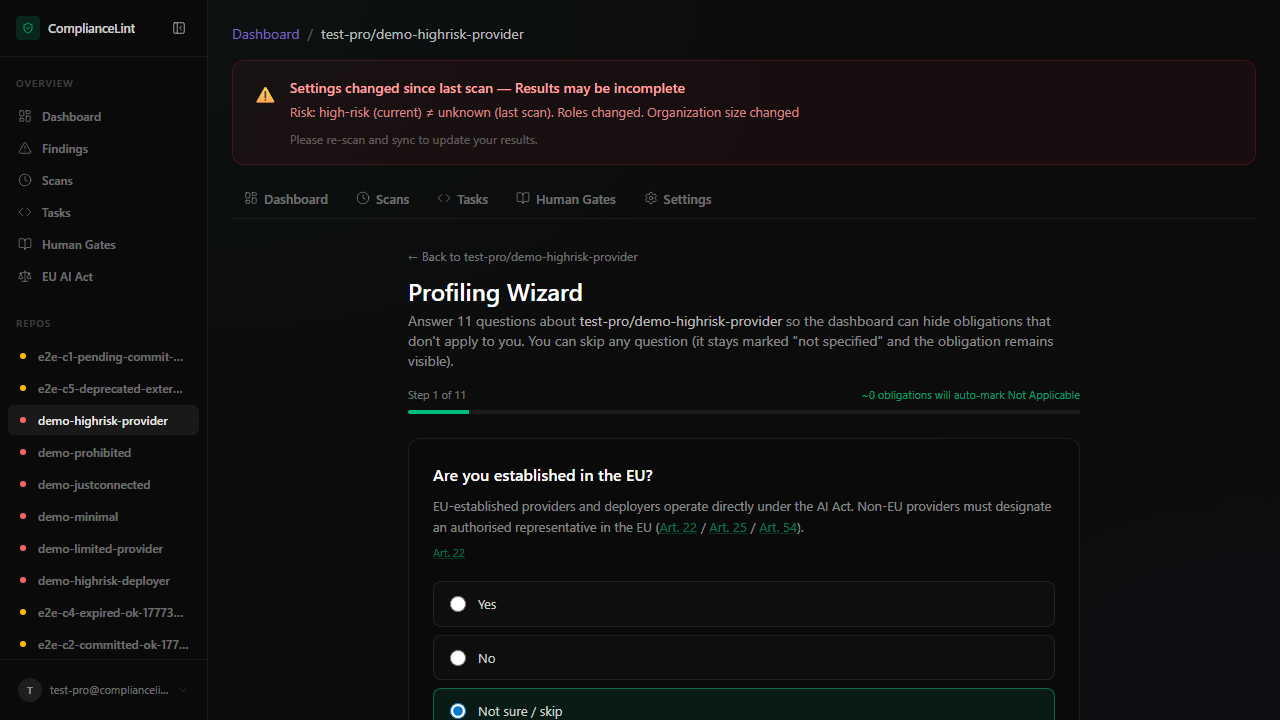
What you'll see: A single-page form. Questions appear one after the other under section headers — About this AI system, Your role, Scope of the AI Act, Prohibited practices, High-risk classification, Transparency and open source, and, for a general-purpose AI model, General-purpose AI model — with a progress line showing how many of the questions on your path you have answered.
Step 2
The wizard starts with what the repository holds. Each question is a single click; you can also pick "Not sure / skip" to leave it open. Skipping keeps the related obligations visible (safe default).
- AI system name — defaults to your repo name; this is the name that appears on your Declaration of Conformity (Annex V point 1). Edit if you have a customer-facing product name that differs from the repo.
- Established in the EU — drives Art. 22 (non-EU providers must appoint an EU representative).
- Is it an AI system? — the Art. 3(1) definition. If it is not, and it is not a general-purpose AI model either, the AI Act does not apply and the wizard ends here.
- General-purpose AI model — if Yes, the model questions (systemic risk, your role for the model, open-source exceptions) follow at the end of the wizard and Art. 51-55 are assessed.
Step 3
The role comes first. One question lists the roles of the EU AI Act — Provider, Deployer, Importer, Distributor, Authorised representative, Product manufacturer — and you select every role you hold for this AI system. "Provider" is an answer like the others: an organisation that only uses somebody else's AI system selects Deployer, and is then not shown the provider's obligations (risk management, technical documentation, conformity assessment, and so on).
Depending on the roles, two follow-up questions appear:
- Deployers, importers and distributors are asked whether they put their name or trademark on the system, modified it substantially, or changed its intended purpose. Under Art. 25(1) each of these makes them the provider of a high-risk AI system — the wizard then shows the provider's obligations as well.
- Product manufacturers are asked whether the AI system goes out with their product under their name or trademark (Art. 25(3)).
- Providers are asked whether somebody downstream has put its name on the system, modified it substantially or changed its purpose so that it became high-risk (Art. 25(2), cooperation with the new provider).
Everyone is asked whether they supply an AI system, model, tools or components that another provider builds into a high-risk AI system (Art. 25(4), written agreement), and suppliers whether those are only public open-source tools or components.
The scan follows the roles: the Scans page says which roles a scan covers when the provider's obligations are not part of it.
Step 4
Scope of the AI Act. Questions that may put the system outside the Act: territorial scope (Art. 2(1)), exclusively military / defence / national security (Art. 2(3)), use by third-country public authorities in international cooperation together with adequate safeguards (Art. 2(4)), and scientific research and development before market placement (Art. 2(6)). Selecting "a natural person using the system for a purely personal non-professional activity" in the role question means the deployer obligations do not apply to that use (Art. 2(10)). An answer that takes the system out of the Act ends the questions about the AI system. Use carefully — these are narrow legal exemptions, not "I just want fewer findings".
Prohibited practices. The Art. 5 list. If one applies, the classification questions are not asked.
High-risk classification. You are not asked to pick a risk class — the wizard concludes it from your answers and shows the result before you finish:
- Annex I — which Union harmonisation legislation covers the product (Section A: medical devices, toys, lifts, …; Section B: machinery, motor vehicles, civil aviation, …), how the AI system relates to the product, and whether a third-party conformity assessment is required (Art. 6(1)).
- Annex III — the use cases, grouped under their eight areas (biometrics, critical infrastructure, education, employment, essential services, law enforcement, migration, justice). Select every use case that applies.
- Art. 6(3) (only for an Annex III system) — the conditions under which such a system is not high-risk, whether you have assessed that it poses no significant risk of harm, and whether it performs profiling of natural persons.
- Training / validation / test data (only where Art. 10 can apply) — rule-based or expert-system AI without statistical training answers No.
Transparency and open source. The Art. 50 functions — asked of the provider (interacts directly with natural persons, generates synthetic content) and of the deployer (emotion recognition or biometric categorisation, deep fakes, AI-generated text on matters of public interest) — and, where the system is neither high-risk nor under Art. 50, whether it is released under a free and open-source licence (Art. 2(12)).
Step 5
When every question on your path has been answered (or explicitly skipped), a Result of your answers box shows the concluded risk classification and your roles, and the Finish button at the bottom activates. The button label shows the count of obligations the wizard will auto-mark Not Applicable based on your answers; a per-article list appears immediately above for transparency.
After clicking Finish, the dashboard returns you to the repo overview with the obligation matrix narrowed. The changes apply to your LATEST scan immediately (no re-scan needed) — applicability is derived at read time from your answers + the current finding set.
Re-opening the wizard: the wizard is always available from the same entry points (banner or Settings → Run Wizard). When you re-open after a previous Finish, every question of your path renders at once with all your saved answers pre-filled — no need to click through from question 1. Change any answer and the impact recalculates immediately; questions that no longer apply disappear together with their answers. Click Finish again to save.
If you previously skipped a question with "Not sure / skip", the skip is preserved — that choice appears selected on re-entry, not blank.
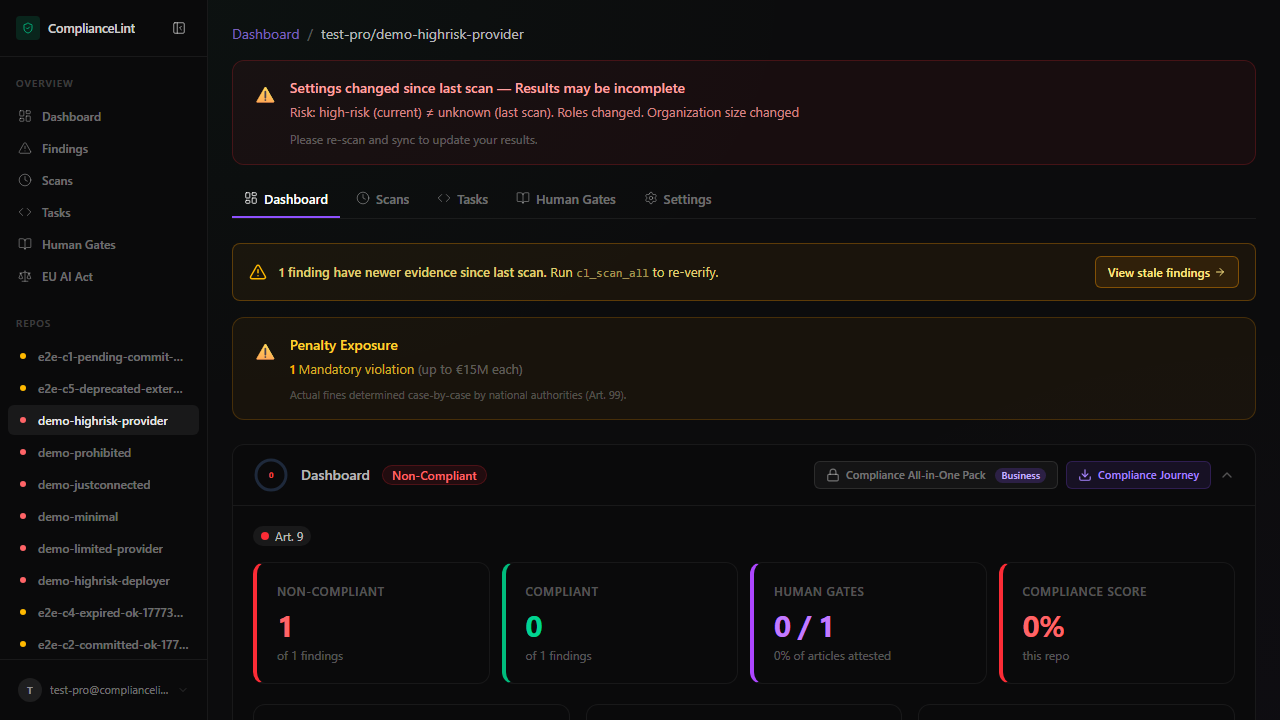
What you'll see: Repo overview after wizard completion: KPI counts now reflect the trimmed obligation set, the AI System Profile section shows a read-only summary of every answer, and a green "Compliant" badge appears if no in-scope obligations are failing.
What can go wrong
- Wizard shows "upgrade required" even though I'm on the Pro plan — The wizard checks your account's CURRENT plan. If you just downgraded then re-upgraded, the cached tier may be stale — sign out and back in to force a tier-cache refresh. If still blocked, your account may have been put into a
subscription_status: past_duestate (open Settings → Billing to verify). - After running the wizard, a finding I expected to see disappeared — That's the wizard working — your answers indicated the obligation doesn't apply. To verify: open the repo's Settings → AI System Profile, find the relevant answer in the read-only summary, and confirm it reflects what you intended. If you disagree, click Run Wizard, change the corresponding answer to "Not sure / skip", and Finish again — the obligation will reappear.
- A red banner says "Wizard answer inconsistency — your Declaration of Conformity or registration export may not satisfy the applicable EU AI Act requirements" — Your answers contain a logical contradiction the EU AI Act would not accept (e.g. you selected the Authorised representative role while your company profile says you are not established in the EU). Click the "Open Profiling Wizard" link in the banner to fix the contradicting answer. Until fixed, the Declaration of Conformity PDF export is blocked.
- The questions don't seem to cover my situation — The wizard covers EU AI Act applicability — it doesn't model GDPR, NIS2, ISO 42001, or other adjacent regimes. If your compliance need is broader, ComplianceLint scopes its own surface but doesn't suppress your need to address those other regimes elsewhere. "Not sure / skip" leaves obligations visible if you'd prefer to make the call case-by-case.
Related
- compliance-profile-setup
- concept-primer
- persona-provider
- persona-deployer
- persona-product-manufacturer
Last updated: 2026-10-29