Plans + billing — what each tier unlocks and how upgrades work
For: all
Tier: free+
Time: ~5 min
Why you'd do this
Every page in the dashboard either is unlocked at your tier or shows an upgrade prompt. Knowing which tier unlocks which feature helps you avoid pricing surprises ("I thought Free included this") and helps team admins justify the right tier to procurement. This chapter is the ground-truth reference for the four tiers and the billing flow.
Before you start
- An understanding that ComplianceLint billing is per ACCOUNT, not per repo or per user — the OWNER's tier covers all their repos and all invited members on those repos
- A LemonSqueezy account if you're upgrading (auto-created during first paid checkout)
Step 1
The four tiers and their headline differences (mirrors the landing pricing matrix — see / §Pricing for the canonical comparison table):
| Feature | Free | Starter (€29) | Pro (€99) | Business (€199) | |---|---|---|---|---| | Projects (repos) | 1 | 2 | 10 | Unlimited | | Scan history | 7 days | Unlimited | Unlimited | Unlimited | | PDF reports | Watermarked | Clean | Clean | Clean | | Team members | Unlimited | Unlimited | Unlimited | Unlimited | | Profiling Wizard (applicability customization) | — | ✓ | ✓ | ✓ | | Risk classification picker | — | ✓ | ✓ | ✓ | | Penalty configuration (precise) | — | ✓ | ✓ | ✓ | | Evidence — text + git_path + URL references | — | ✓ | ✓ | ✓ | | Evidence — file upload (bytes via repo) | — | — | ✓ | ✓ | | Human Gates questionnaires (per-obligation Yes/No + Notes) | — | ✓ | ✓ | ✓ | | Declaration of Conformity PDF (Art. 47 Annex V) | — | — | ✓ | ✓ | | Technical Documentation PDF (Annex IV §1–§8) | — | — | ✓ | ✓ | | Per-article Compliance PDF | — | — | ✓ | ✓ | | SARIF export | — | — | ✓ | ✓ | | CI/CD quality gate | — | — | ✓ | ✓ | | Multi-framework mapping (ISO 42001, NIST AI RMF) | — | — | — | ✓ | | Regulation updates timeline (in-app — email digest is roadmap) | ✓ | ✓ | ✓ | ✓ | | Compliance All-in-One Pack export | — | — | — | ✓ |
All prices are per MONTH, billed in EUR. Annual billing is available on all three paid tiers — Starter saves €48/year (€25/mo billed yearly = €300/yr vs €29 monthly), Pro saves €240/year (€79/mo billed yearly, ~20% off), Business saves €600/year (€149/mo billed yearly, ~25% off).
Phase 1 (2026-05-21): the Human Gates questionnaire wizard moved from Pro+ to Starter+, so the €29 Starter tier now includes the full per-obligation Yes/No attestation surface (previously Pro+ only). The three Human Gates PDF artefacts (Declaration of Conformity, Technical Documentation, per-article Compliance PDF) stay Pro+ — Starter attests via the wizard, Pro+ unlocks the legal PDF outputs.
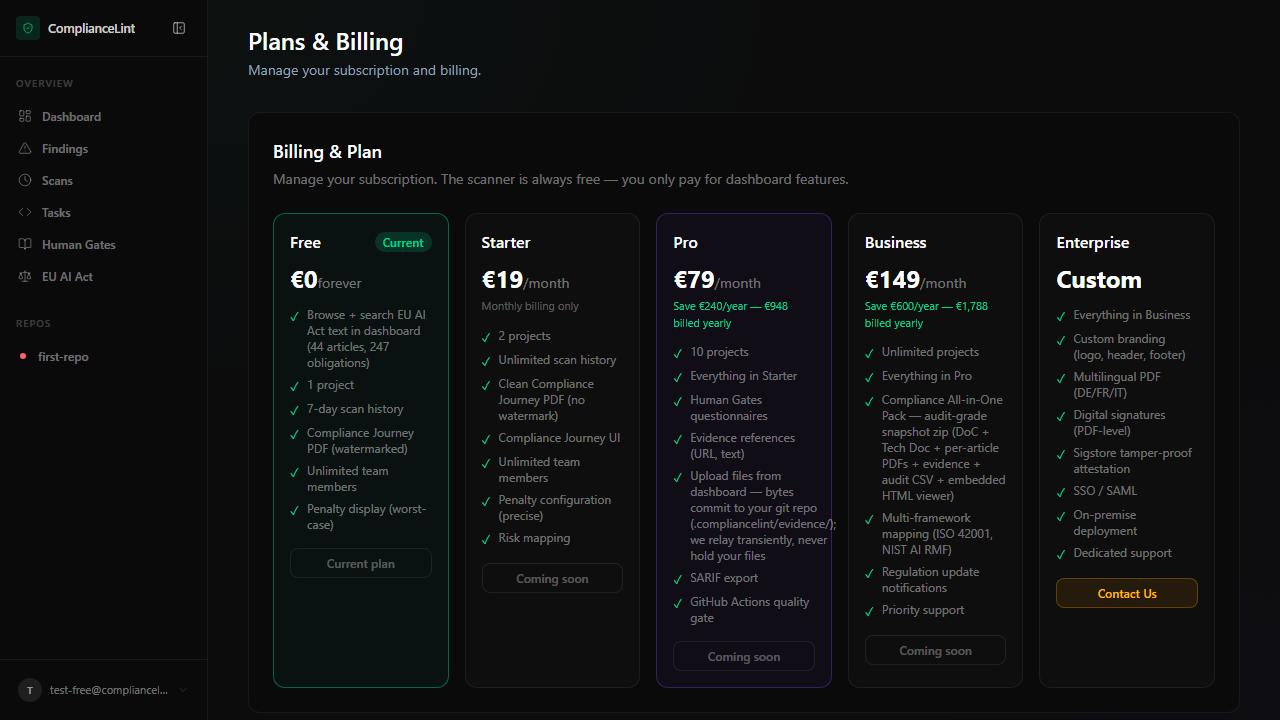
What you'll see: Plans page with a five-column comparison grid (Free / Starter / Pro / Business / Enterprise). Annual / Monthly toggle at the top (Annual selected by default — Save up to 25%). Current tier is marked "Current plan"; higher tiers show an Upgrade button; Enterprise shows Contact Us.
Step 2
Click Upgrade on the target tier. The flow:
- Redirects to LemonSqueezy checkout (hosted by them, not us)
- Card / SEPA / PayPal supported; corporate invoicing via the Business+ overlap
- After successful payment, returns to
/dashboard/planswith a confirmation banner - Tier upgrades take effect IMMEDIATELY — newly-unlocked features (Human Gates, All-in-One Pack export, etc.) become usable in the same session
- Webhook from LemonSqueezy updates the account's
plancolumn; if you don't see the upgrade reflected within 30 seconds, refresh the page (occasional webhook delay)
Annual switch: same upgrade button — pick "Yearly" radio on the LemonSqueezy page. Annual is single-up-front; the dashboard shows "renews <date>" instead of monthly cycle.
Step 3
Downgrade flow:
- Click Manage subscription → opens the LemonSqueezy customer portal (hosted by them)
- Pick the lower tier, confirm. The change takes effect at the END of your current billing cycle (no proration / refunds for partial months)
- At cycle end, the dashboard transitions to the new tier automatically
If the new tier's maxRepos is lower than your current owned repos, the OLDEST repos beyond the limit are LOCKED (read-only) until you re-upgrade or unlink. Locked repos preserve all data; only writes are gated. The dashboard shows a red banner naming every locked repo until the lock is resolved.
See Team collaboration for how downgrade blast radius affects invited members.
Step 4
Cancellation (§ 312k BGB Kündigungsbutton): visit /kuendigung — public page, no login required (legal requirement: "ohne Zugangsdaten"). Enter your account email, click jetzt kündigen, and check your inbox for the confirmation link (valid 30 minutes).
After clicking the confirmation link, the cancellation is queued: paid-tier access stays active until the END of your current billing cycle, then your account reverts to Free. We send a durable-medium confirmation email per § 312f BGB the moment the link is clicked.
The LemonSqueezy customer portal still has its own "Cancel subscription" button that achieves the same result. We recommend /kuendigung because it sends OUR durable-medium confirmation email; the LS portal sends only LS's confirmation, which is sufficient legally but harder to audit later.
Free tier consequences after the cycle ends:
maxRepos = 1→ repos beyond the first locked- Human Gates Fill, All-in-One Pack export, SARIF, CI/CD all locked
- Past exports retention drops to 7 days (active exports stay downloadable until the 7d window expires)
- Team members on your repos lose paid-tier access on those repos (their account state unchanged, but THEY now see upgrade prompts on YOUR repos)
Resubscribing within 30 days restores all previous data; after 30 days the account moves to a deletion-pending state (legal data retention requirements). Email notice sent at T-7 days before deletion-pending.
Step 5
Withdrawal (§ 356a BGB Widerruf, in force 19 June 2026): if you're within 14 days of the FIRST paid checkout, you can withdraw the contract entirely — pro-rata refund applies, not just cancellation going forward. Visit /widerruf — same email-magic-link flow as cancellation but with refund handling.
Difference from cancellation:
- § 312k Cancellation (
/kuendigung): terminates contract going FORWARD; you keep paid-tier until cycle end; no refund - § 356a Withdrawal (
/widerruf): cancels the contract RETROACTIVELY (LS subscription cancelled immediately) and triggers a manual refund minus pro-rata charge for the days already used
How refund processing works (pre-launch, zero-customer state): the moment you click the magic-link, three things happen automatically — (1) your LemonSqueezy subscription is cancelled via the LS API, (2) you receive a durable-medium confirmation email per § 312f BGB, (3) an internal support ticket is sent to info@compliancelint.com. A human then computes the pro-rata refund using the formula paid_amount × (remaining_days / cycle_total_days) (illustrated in the Widerrufsbelehrung with €228 annual × (358/365) ≈ €223.63 example) and processes it through the LemonSqueezy admin dashboard. § 355(3) BGB gives us 14 days from withdrawal notice to complete the refund; we target 72 hours.
After 14 days, withdrawal is no longer available — use /kuendigung for cycle-end cancellation instead.
Read the full instruction at /legal/widerrufsbelehrung — this is the BGB Anlage 1 model text, adapted for SaaS subscriptions per § 327(2) Nr. 2 + § 356(4) + § 357a(2). It documents the "Beginn der Ausführung" trigger (first sync OR first dashboard login, whichever earlier) which determines the pro-rata charge baseline.
Step 6
Invoice history is on the LemonSqueezy customer portal (linked from /dashboard/settings → Billing card). Each invoice is downloadable as PDF with VAT calculations per your country.
EU customers: VAT collected per LemonSqueezy's MOSS; reverse-charge for B2B with valid VAT id (entered on first checkout).
Refund policy:
- First 14 days (§ 356a BGB Widerruf): use /widerruf — pro-rata refund, full instruction at /legal/widerrufsbelehrung
- After 14 days, no longer want the service: use /kuendigung — no refund, you keep paid-tier until cycle end
- Billing error or service unavailable: case-by-case, email
billing@compliancelint.devwith your account email + the issue
What can go wrong
- Paid via LemonSqueezy but dashboard still shows me as Free — Webhook delay. Wait 60 seconds and refresh. If still Free, open Settings → Billing — if the LemonSqueezy customer link shows your active subscription but our dashboard says Free, the webhook failed to deliver. Email
billing@compliancelint.devwith your LemonSqueezy order id; manual sync resolves within a few hours during EU business hours. - Downgraded but my repos aren't locking — I expected Free maxRepos = 1 — Downgrade takes effect at END of current billing cycle, not immediately. The dashboard shows "Plan ends
<date>— switching to Free" at the top until the cycle ends. If you want immediate downgrade, contact support — they can apply it manually but there's no proration. - Card declined mid-cycle — what happens? — LemonSqueezy retries the card 3 times over 7 days. If all retries fail, account moves to
subscription_status: past_due— paid features stay accessible during this grace period (additional 7 days). After 14 total days unpaid, account moves to Free (same locked-repo consequences as voluntary downgrade). Update card details in LemonSqueezy customer portal; auto-resumes once payment succeeds.
Related
Last updated: 2026-08-11