Compliance Profile setup — fill once, auto-populate every PDF
For: all
Tier: free+
Time: ~4 min
Why you'd do this
The EU AI Act Declaration of Conformity must state the provider's name and address (Annex V point 2). The Compliance Profile holds your company identity (legal name, registration number, country, business address, contact email) once at the account level so every scan-time PDF auto-populates it — without it, exported documents use placeholder "Your Company" text.
Before you start
- Your company's official legal name (as it appears on the trade register), NOT the trade name
- Registration number (HRB / VAT / SIREN — whichever applies)
- Country of EU establishment, OR a country outside the EU PLUS the details of an EU Authorised Representative (Art. 22)
- Headcount, annual turnover and annual balance sheet total (Starter+) — the dashboard derives an indicative company size class (SME, SMC or other enterprise) for the fine estimates under Art. 99 and to flag potential eligibility, for high-risk AI systems, for the simplified technical documentation of Art. 11(1); legal SME/SMC status also depends on the applicable reference-period, partner/linked-enterprise and public-body rules
Step 1
Click your avatar (bottom-left of sidebar) → Settings → Open Compliance Profile card. The form opens with any existing values pre-filled from your last save. Compliance Profile is account-level — every repo on this account shares this data, so you only fill it once.
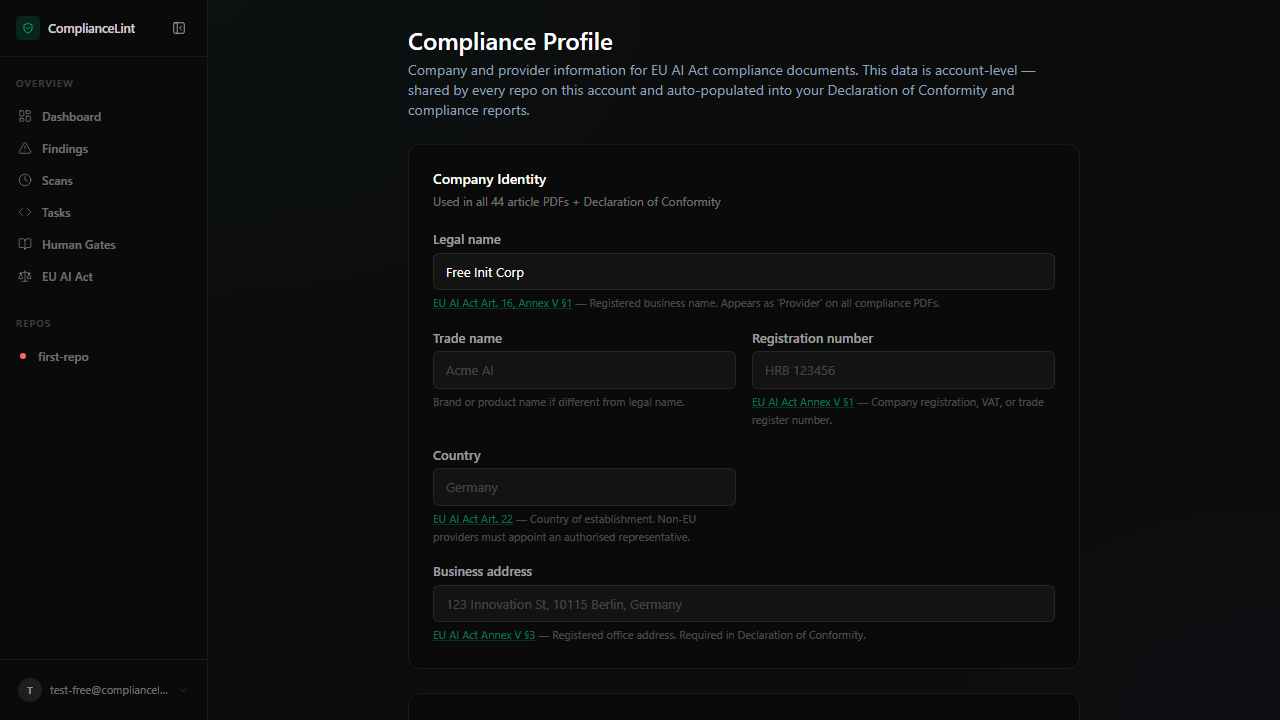
What you'll see: The Compliance Profile form: Company Identity card at top (legal name, trade name, registration number, country, business address), followed by Organisation Details and Authorised Representative cards if applicable.
Step 2
Legal name (required) — appears as the "Provider" line on every Declaration of Conformity. Use the exact name on your trade register entry, not a marketing brand.
Trade name (optional) — only if your customer-facing brand differs from the legal name (e.g. "Acme AI" sold by "Acme Holdings GmbH").
Registration number (optional) — country-appropriate identifier: German HRB, French SIREN, Spanish NIF, etc. Appears on the compliance PDFs.
Country of establishment (required) — drives whether the system needs an EU Authorised Representative. If you select a non-EU country, a new card appears asking for the Authorised Rep's details (Art. 22).
Step 3
Business address (required) — the provider's address used for the Declaration of Conformity, not the dev team's location. Annex V point 2 requires the provider's name and address. If you have multiple sites, use the one on your trade-register filing.
Contact email (required) — used as the post-market monitoring contact (Art. 72) and on regulator submissions. Use a role-based mailbox (compliance@yourco.com) rather than an individual's address — it survives staff changes.
Step 4
Indicative company size class (Starter+) — enter the headcount (annual work units), annual turnover (excluding VAT and other indirect taxes) and annual balance sheet total of the latest approved accounting period. The dashboard derives an indicative class for estimation purposes:
| Class | Headcount | Annual turnover or balance sheet total | |---|---|---| | Microenterprise (SME) | < 10 | ≤ €2 M or ≤ €2 M | | Small enterprise (SME) | Not micro; < 50 | ≤ €10 M or ≤ €10 M | | Medium-sized enterprise (SME) | Not micro or small; < 250 | ≤ €50 M or ≤ €43 M | | Small mid-cap enterprise (SMC) | Not an SME; < 750 | ≤ €150 M or ≤ €129 M | | Other enterprise | any other combination | |
For the fines of Art. 99(3)-(5), SMEs get the lower of the fixed amount and the turnover percentage (Art. 99(6)). SMCs get the lower amount for the fines of Art. 99(4)-(5) (Art. 99(6a)), while Art. 99(3) remains subject to the higher amount for SMCs. Other enterprises are subject to the higher amount under Art. 99(3)-(5). The Penalty Banner on each repo's overview page shows the estimate. For high-risk AI systems, SMEs, including start-ups, and SMCs may use the simplified technical documentation of Art. 11(1).
This indicative class is derived from one year's figures for your enterprise alone and is not sufficient to determine legal SME or SMC status. The two-consecutive-accounting-period rule, the aggregation of partner and linked enterprises and the public-body exclusion of Recommendations 2003/361/EC and (EU) 2025/1099 are not applied (see the note under the form).
Step 5
Visible only if your Country of establishment is OUTSIDE the EU. Art. 22 requires non-EU providers of high-risk systems to designate a written-mandated EU representative.
Required fields when shown:
- Representative's legal name
- EU Member State of establishment
- Business address in that Member State
- Contact email + phone
- Date of mandate (start of representation agreement)
The authorised representative's name and address flow into the Declaration of Conformity where applicable (Annex V point 2).
What can go wrong
- After saving, the dashboard banner "Complete your Compliance Profile" still shows — The banner clears when
legal_nameis non-empty. If you saved with the legal-name field empty (e.g. only filled trade name), the banner persists. Re-open the profile and ensure Legal name has a value, then save again. - Generated PDF shows "Your Company" instead of my legal name — PDFs are generated at scan time using the Compliance Profile snapshot at THAT moment. If you ran the scan BEFORE filling the profile, that scan's PDFs are baked with the placeholder. Ask your AI to re-scan and sync to regenerate with the current profile values. The old scan stays in history — only NEW scans pick up the updated profile.
- Country is non-EU but the Authorised Representative card never appears — The card is conditional on Country selection — if you set Country and saved BEFORE the card had time to render, the form may have submitted without the rep section. Refresh the page and the card should now appear; fill and save again.
Related
Last updated: 2026-10-29