Quick Start — your first scan in 5 minutes
For: all
Tier: free+
Time: ~5 min
Why you'd do this
ComplianceLint is MCP-only — there is no CLI. The first thing you do is pair your IDE with a SaaS account, scan a repo, and see what comes back on the dashboard.
Before you start
- An MCP-enabled IDE (VS Code with Claude Code extension, Cursor, or any MCP host)
- A GitHub account (for the SaaS sign-in)
- A target repo to scan — for this walkthrough we use the sample fixture at
private/manual-fixture/, but any local AI/ML codebase works
Step 1 — Sign in
Open https://compliancelint.dev. Click Dashboard in the top-right (or scroll down to the pricing section and click any tier's CTA). You're prompted to sign in with GitHub or Google; first-time sign-in creates a free account automatically and the dashboard opens to an empty state because no repo is connected yet.
Step 2
In your MCP IDE, ask your AI: "Connect this project to ComplianceLint." Your AI invokes the cl_connect tool; the MCP host opens your browser for sign-in (GitHub or Google), then writes a .compliancelintrc to your project root with the API key + dashboard URL.
If you've already paired this project, the connect tool returns already_connected and your config stays unchanged:
{
  "status": "already_connected",
  "email": "you@example.com",
  "dashboard_url": "https://compliancelint.dev/dashboard",
  "message": "Already connected. Run cl_sync() to upload scan results."
}
What you'll see: JSON response with status: connected (first time) or already_connected (re-runs). A new .compliancelintrc appears in the workspace root.
Step 3
Ask your AI: "Scan my project for EU AI Act compliance." Your AI invokes the cl_scan_all tool; it reads the project structure, fills compliance answers per article, and the scanner maps those answers to obligations. For the fixture project this typically produces 226 findings across 44 articles (exact count varies with your wizard answers and codebase shape).
The MCP response includes a structured JSON report. The header carries metadata + per-article status; the body's results field has each article's finding_count + top_findings preview (up to 5 per article). Compact-but-real excerpt from an actual scan against the sample fixture:
{
  "report_type": "compliance_scan_summary",
  "project": "<your-project-path>",
  "overall_compliance": "non_compliant",
  "total_modules": 44,
  "regulation": "EU AI Act (Regulation (EU) 2024/1689)",
  "articles_scanned": [
    "Art. 4 (AI Literacy): non_compliant",
    "Art. 5 (Prohibited AI Practices): unable_to_determine",
    "Art. 6 (Classification Rules for High-Risk AI Systems): non_compliant",
    "Art. 9 (Risk Management): non_compliant",
    "Art. 10 (Data Governance): non_compliant",
    "Art. 12 (Record-keeping): non_compliant"
    /* ... 38 more articles ... */
  ],
  "results": {
    "article_4": {
      "overall": "non_compliant",
      "finding_count": 1,
      "top_findings": [
        {
          "obligation_id": "ART04-OBL-1",
          "level": "non_compliant",
          "description": "No AI literacy documentation detected. Art. 4 requires providers and deployers to take measures to ensure a sufficient level of AI literacy of their staff."
        }
      ],
      "note": "Use cl_scan(articles=\"4\") for full findings."
    },
    "article_9": {
      "overall": "non_compliant",
      "finding_count": 17,
      "top_findings": [
        {
          "obligation_id": "ART09-OBL-6",
          "level": "non_compliant",
          "description": "No testing infrastructure detected. Art. 9(6) requires testing to identify appropriate risk management measures and ensure consistent performance."
        },
        {
          "obligation_id": "ART09-OBL-1",
          "level": "partial",
          "description": "Risk management documentation found: docs/risk_assessment.md. Evidence: docs/risk_assessment.md"
        },
        /* ... 3 more top findings ... */
      ],
      "note": "Use cl_scan(articles=\"9\") for full findings."
    }
    /* ... 42 more article result blocks ... */
  },
  "disclaimer": "AI-assisted compliance assessment, not a legal opinion. All findings require human review and legal counsel."
}
Three things to notice in the response:
overall: non_compliantdoesn't mean every finding is bad. Article 9 above shows 17 findings, buttop_findingsmixesnon_compliant(real gaps) withpartial(evidence found but incomplete). Thepartialentries cite the actual file the scanner relied on (e.g.docs/risk_assessment.md).top_findingsis a preview, not the full list. Article 9 has 17 findings total but only the top 5 by severity appear here. Ask your AI: "Show me all findings for Article 9" to see all 17 with full evidence context (your AI invokescl_scan(articles="9")under the hood).- Ask for a single-article scan if the full report is too large to read inline. A single-article scan returns ~1-3 KB and renders cleanly; the full project scan is ~50-60 KB and your IDE may save it to a file rather than displaying inline.
What you'll see: 226 findings across 4 buckets (COMPLIANT / NON_COMPLIANT / UNABLE_TO_DETERMINE / NOT_APPLICABLE). The split depends on your project — a documentation-heavy AI prototype will skew toward UNABLE_TO_DETERMINE, a tested production system toward NON_COMPLIANT or COMPLIANT.
Step 4
Ask your AI: "Sync my scan results to the dashboard." Your AI invokes the cl_sync tool; the local scan results are pushed to your dashboard account. This is the only step that touches the network with your code metadata; bytes of evidence files are only relayed if you explicitly upload them through the dashboard later.
Successful response (the dashboard_url is the most useful part — open it to view the scan in the browser):
{
  "status": "synced",
  "scan_id": "fe06dcbb-5848-4280-99d2-24272a9a061c",
  "repo_id": "1bf043c8-815a-456f-8fcb-12efc143e694",
  "dashboard_url": "https://compliancelint.dev/dashboard/repos/<repo>/scans/<scan>",
  "articles_synced": [/* 44 art ids */],
  "message": "Scan results uploaded.",
  "pending_evidence": { "pulled": 0, "confirmed": 0, "errors": 0 },
  "broken_link_check": { "checked": 0, "broken": 0 }
}
What you'll see: JSON response with status: synced, a scan_id UUID, and a dashboard_url you can click to view the scan.
Step 5
Open the dashboard URL from the sync response. You see the repo card with a compliance score ring, a KPI row tracking the non-compliant + compliant + scans + score, and the latest scan listed under the repo.
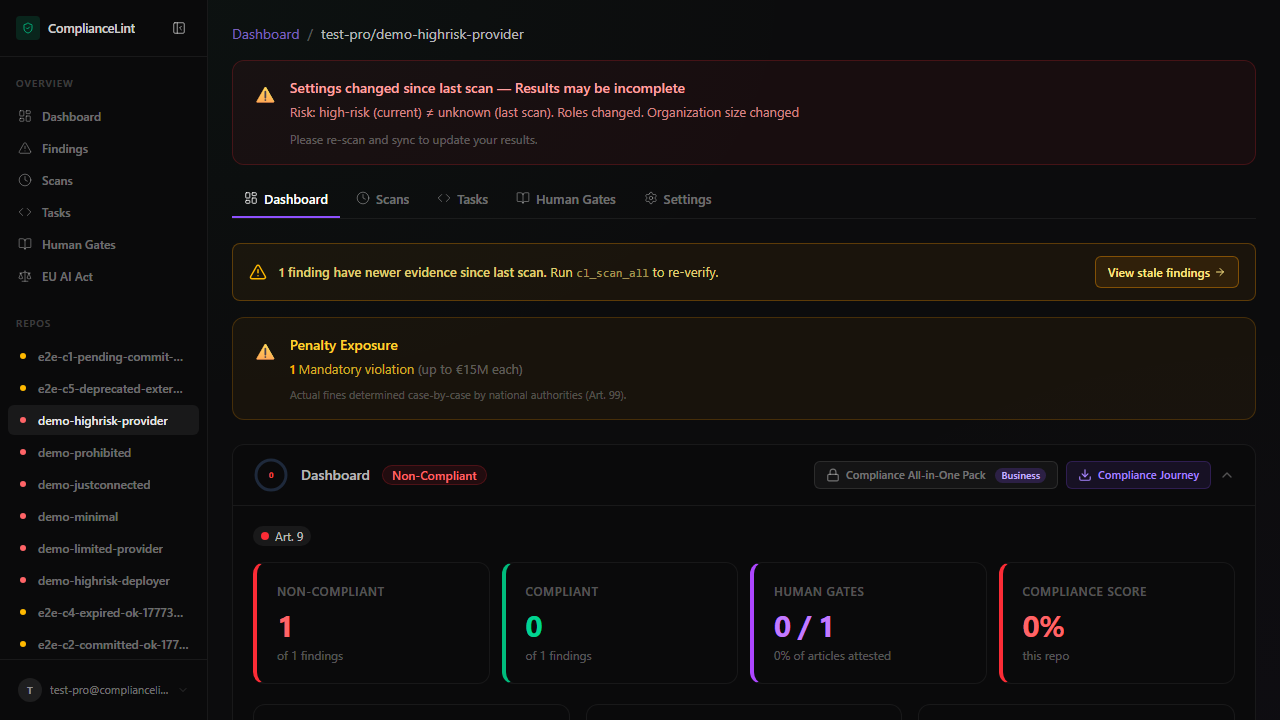
What you'll see: Score ring (top-left), four KPI cards (Non-Compliant / Compliant Repos / Total Scans / Compliance Score), and the repo's first scan row beneath.
What can go wrong
cl_connectfails withunauthorized— The API key from the dashboard is single-use per pairing — if you've already paired this project once, generate a fresh key under Settings → API Keys and try again.cl_scanreturns 0 findings on a project that obviously has AI code — Check that the repo has at least one Python/JS/TS file containing ML imports (torch / tensorflow / sklearn / langchain / etc.). ComplianceLint detects AI projects by import surface, not by filename.- Dashboard URL from
cl_syncshows404or empty — The first sync may take 5-10 seconds to populate. Refresh once. If still empty, ask your AI to sync again — the operation is idempotent.
Related
Last updated: 2026-08-11