Human Gates — structured questionnaires for procedural obligations
For: all
Tier: pro+
Time: ~9 min
Why you'd do this
Some EU AI Act obligations can't be discharged by uploading a single file — they require structured documentation: a risk-management system per Art. 9 needs identified hazards, mitigation, residual risk; a human-oversight design per Art. 14 needs measures, responsibilities, override mechanism. Human Gates render these as multi-section questionnaires that produce regulator-ready PDFs on completion, with the audit trail of who answered what when.
Before you start
- Pro+ tier — Human Gates Fill is the gating feature for this chapter; lower tiers see questionnaires read-only with an upgrade prompt on the Save action
- At least one Human Gate task in the Tasks list (typically appears automatically on a high-risk classified repo)
Step 1
From the Tasks page, click Open on any Human Gate task to land on the per-article questionnaire. The page layout:
- Top — "← Back to Human Gates" link + article header (e.g. "Art. 9 — Risk Management System") + EUR-Lex link + Related Recitals citations
- Progress bar — "N of M obligations confirmed" + percent
- Body — obligation cards stacked vertically. Each card includes its Legal Reference (verbatim article quote), the scanner-found evidence (when available), the question text + answer field, and a Save action
- Profile Status sidebar (right) — your role / risk classification / GPAI / Annex III / Open-source / Org size, with an "Edit in Profiling Wizard →" link
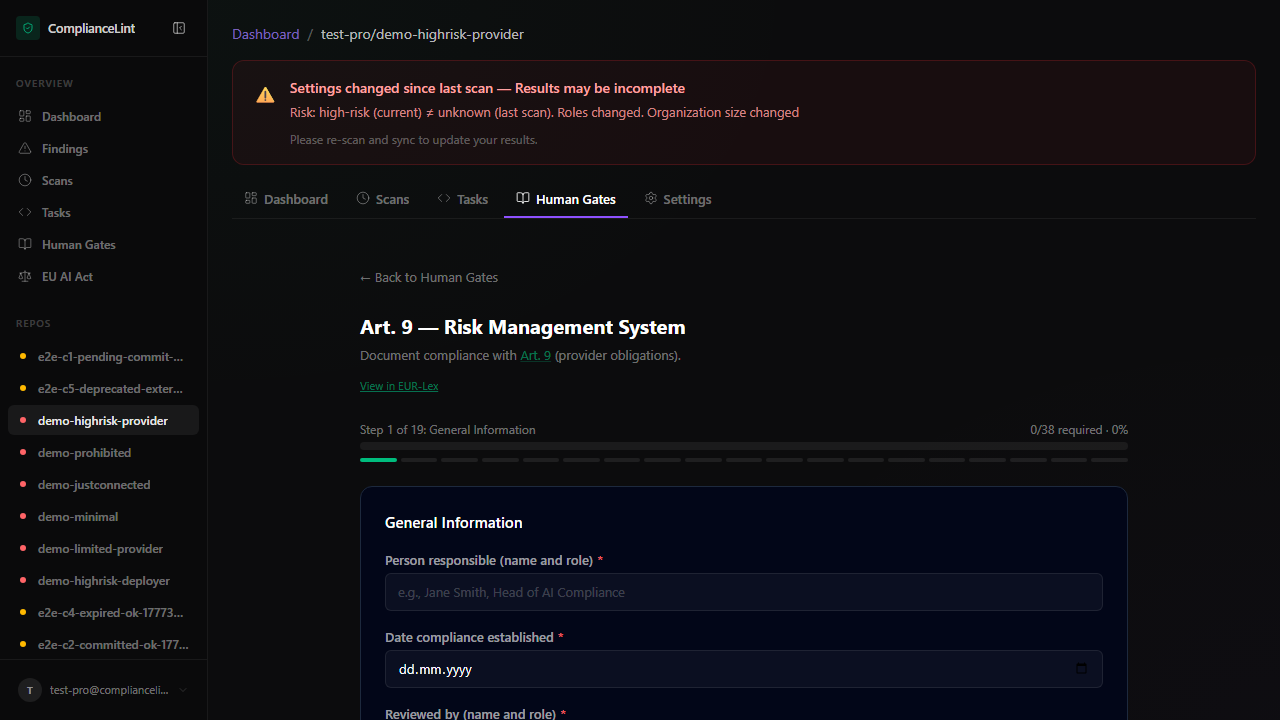
What you'll see: Per-article questionnaire page. Art. 9 example shows the header + "0 of 16 obligations confirmed 0%" progress + the first obligation card (Art. 9(1) Risk Management System) with its verbatim quote. Profile Status sidebar on the right shows the current repo's role / risk band / Annex III category.
Step 2
Sections come in three flavours:
General-information sections — short-text fields (person responsible, date compliance established, reviewer). Required fields show a red asterisk; soft-required fields show a blue "recommended" badge. Save unblocks the next section.
Hazard / risk sections — repeating subforms (e.g. "Add another identified hazard"). Each subform has its own required fields and at least one entry must be present. Use "Mark as not applicable" to skip the entire section with a documented reason (e.g. minimal-risk system not requiring full FMEA).
Attestation sections — sign-off fields restricted by role. Engineer can fill data fields but only a designated Reviewer (set in Repo Settings → Team) can complete the sign-off. Useful when separating preparers from approvers per Art. 17 quality-management requirements.
Step 3
Each section has a sidebar evidence panel that combines:
- Auto-detected evidence — files the scanner already found matching this section's obligation (e.g.
RISK_ASSESSMENT.mdfor Art. 9 §1) - Drag-drop dropzone — attach additional files at the section level (these get tagged to the section in the audit trail)
- Link git path — point to in-repo files instead of uploading
Section-attached evidence is included in the exported PDF as appendix references — a regulator reading the PDF can trace each answer back to its supporting document.
Step 4
Some Human Gate articles include explicit derogations: under specific conditions an obligation doesn't apply. The questionnaire surfaces these as:
"Derogation clause" badge (yellow) on a section — clicking expands the legal text of the derogation + the linked main obligation it would suspend. Filling the derogation section with positive attestation marks the linked obligation NA on the next scan.
"Mark section NA" — for sections that don't apply to your specific role / risk class even though the article is otherwise applicable. Picks from a reason dropdown; reason renders in the PDF so the regulator sees the WHY.
Derogations and NA both preserve the original obligation in the audit trail with the suppression reason — they don't silently delete the requirement.
Step 5
When all required sections are filled (and any required attestations signed), the questionnaire shows "Ready to submit" in the header. Click Submit for review OR Mark complete (depending on whether your repo has multi-person sign-off enabled).
Submission generates the structured PDF (Art. 9 → "Risk Management System" formatted per the Annex IV template; Art. 14 → "Human Oversight Design" similar). The PDF is downloadable from the task row's Action column and is also bundled into the Compliance All-in-One Pack export (Business+).
The corresponding Art. X finding moves to COMPLIANT on the next scan, with the Human Gate completion as its evidence linkage.
What can go wrong
- Section progress stays at "5/19 required" even though I filled all visible required fields — Some required fields are conditional — they only appear after selecting a specific value in an earlier field (e.g. "residual risk acceptable?" appears only if you selected "yes" on "residual risk identified?"). Scroll up the section and look for unfilled fields in newly-revealed sub-areas. The progress counter includes conditional requireds.
- I marked a section NA but the PDF export still includes the empty section — NA sections render in the PDF with the reason text instead of blank fields — they don't disappear. This is intentional for regulator readability: a missing section looks like an oversight, but "Section NA:
<reason>" looks like a deliberate scoping decision. If the visual gap is bothering you, the appendix alternative format collapses NA sections to a single line. - Sign-off field is grayed out and the role-restriction tooltip says I'm not designated — Sign-off requires a designated Reviewer role on the repo. Open Repo Settings → Team and check the Reviewer column. The OWNER designates Reviewers; if you ARE the owner, you can self-designate by ticking your own row. Multi-person sign-off is a Pro+ feature; Starter accounts use single-person workflows.
- Attached PDF appears in the section but doesn't show in the exported submission PDF — Section-attached evidence shows as appendix references with the filename + commit SHA. The actual PDF bytes aren't embedded in the submission PDF (would bloat to 100s of MB for a heavy FMEA). To bundle the actual files, use the Compliance Time Capsule export — it produces a ZIP with the submission PDF + every referenced evidence file.
Related
Last updated: 2026-08-11